
 Changing the TREX Host Name (Single
Host)
Changing the TREX Host Name (Single
Host)

Use
You change the TREX host name for a TREX single-host installation on the host where TREX has been installed. To rename the TREX host you have to do the following:
...
● Change the TREX configuration files.
● Change the profiles settings.
Prerequisites
You have stopped TREX.
Change the TREX Configuration Files
...
1. Change the old TREX host name to <new_trex_hostname> in the configuration file <TREX_INSTANCE>\topology.ini.
You have to change the TREX host name in several places in the configuration file topology.ini (for example: <host>, url=, user=, sap_retrieval_path=, master_hosts=). Open the file, search for your old TREX host name, replace it with <new_trex_hostname> and save the file.
2. Change the old TREX host name to <new_trex_hostname> in the configuration file <TREX_INSTANCE>\sapprofile.ini.
a. If the new host name does not match the host name on operating system level (as returned by the command hostname) then change the line #SAPLOCALHOST= to SAPLOCALHOST=<new_trex_hostname>

You have to remove the sign # in front of SAPLOCALHOST so that the variable SAPLOCALHOST is used.
b.
If you have
already specified this TREX name server as the master name server by choosing
the Convert to Master function in the TREX admin
tool (stand-alone), replace the old TREX host name in section # TREX-Name Server
TREX/NameServer/Master=<new_trex_host
name>:
3XX01.<instance_number>
You have to remove the sign # in front of the line so that the variable is used.

If you have not changed the role of the name server to master name server, you do not have to modify this section of the configuration file.
3. Change the old TREX host name to <new_trex_hostname> in the configuration file <TREX_INSTANCE>\TREXWebServer.ini.
You have to change the TREXWebServer.ini only if you have installed the Web Server.
Navigate to section [HTTPSERVER] and replace the old TREX host name with <new_trex_hostname>: URL=http://<new_trex_hostname>.<URL>:...
Example Scenario for Single-Host Installation
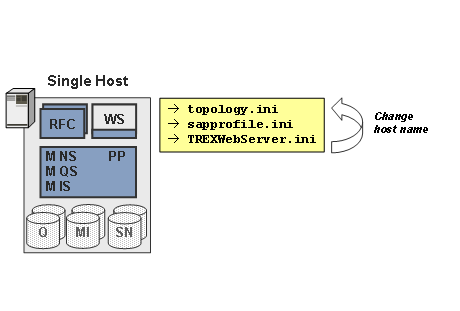
Overview of TREX Configuration Files to Be Changed
Host |
topology.ini |
sapprofile.ini |
TREXWebServer.ini |
Single Host |
Change old host to new host name |
Change old host name to new host name |
Change old host name to new host name (only if the Web server was installed) |
Change the profiles settings
After changing the TREX configuration files you change the profile settings as described in Changing the Profile Settings.
Result
You have changed the TREX host name for a TREX single-host installation. You can now restart TREX.