
 EnablingCo-Existence of
Several Portals
EnablingCo-Existence of
Several Portals

This scenario variant describes the interoperability that the SAP NetWeaver Portal provides. The portal delivers pre-built business packages for SAP applications in a unified user interface. The companies need to deliver pre-built, easy to develop and relevant content from different portal solutions. This helps to avoid an increase in the custom development costs and maintenance problems.
Architecture of the Scenario Variant
There are two cases:
SAP NetWeaver Portal as Leading Portal
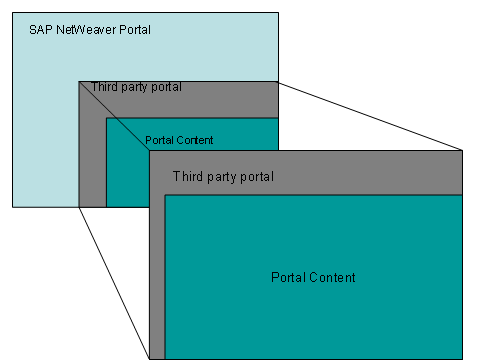
The following figure shows the SAP NetWeaver Portal as the leading portal:
Third Party Portal as the Leading Portal
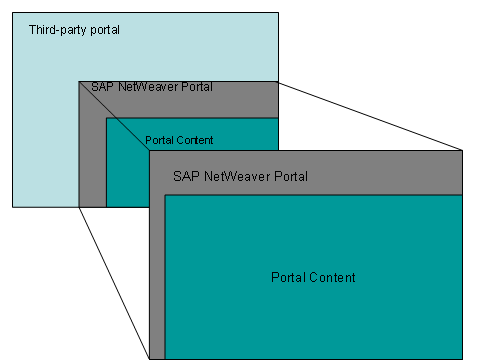
The following figure shows the third party as the leading portal:
However, administrative operations such as centralized and synchronized user management, Single-Sign On (SSO), definition of similar style sheets and so on have to be implemented too.
Benefits
In some cases, it makes sense to run two portals side-by-side in a coexistence pattern, delivering specific content to different groups of users. In other cases, one portal may already be implemented and up-and-running as the leading portal – where a portal-in-portal strategy is the optimum solution. In both situations, it is important that security and usability issues are addressed and resolved.
The portal-in-portal scenario defines one leading portal which acts as first entry-point for any user and the respective underlying portals that provide and deliver their specific portal to the leading portal.
SAP NetWeaver Portal provides an enhanced portal with support for Web Services for Remote Portlets (WSRP), Single Sign-On, user management, unified navigation, and look-and-feel across multiple vendor portals, namely IBM and Microsoft. With the portals interoperability, you now have the flexibility to create user interfaces that span SAP and non-SAP processes to best serve the needs of your end user.
From enabling portal coexistence and interoperability, you gain the following benefits:
...
1. Flexibility to reuse existing investment in technology, products, and skills.
2. Leverage openness of SAP NetWeaver to collaborate and coexist with various solutions and infrastructures (including appropriate internet standards, for example WSRP).
3. Easy access to SAP content.
4. Utilize SAP’s interface to SAP applications.
5. Reduce Total Cost of Ownership (TCO) since custom development time will be shortened and maintenance costs reduced, by reusing existing infrastructure.
6. Secure access to the SAP content.
7. Support for a global or federated portal across vendors.
8. Consistent usability and content access across vendor portals.
9. Use the easy to develop functionality to SAP applications and portfolio of portal content to reduce development time and maintenance costs.
Required or Optional Installable Units
To use this variant you require the following installable units:
● Enterprise Portal (EP)
● Application Server Java (AS Java)
For more information about the required system landscape, see the Master Guide on service.sap.com/instguidesNW70.
IT Processes of the Scenario Variant
|
IT Process |
Description |
Describes the processes you have to take to establish portal interoperability. |
Related Information

For more information, see the following topics on sdn.sap.com → SAP NetWeaver Platform → IBM Interoperability:
"How to Set Up SSO Between SAP Enterprise Portal and IBM WebSphere Portal Using Trust Association Interceptor" and
“How to Set Up SSO Between IBM WebSphere Portal and SAP NetWeaver Portal using JAAS”