
 Standard Interface Determination

Use
You can specify to which inbound interface at the receiver the message is to be sent at runtime. You also have the option of specifying a mapping and (when multiple inbound interfaces are defined) a condition for each inbound interface.
Features
Enter the
assignment between the outbound interface and the inbound interface(s) in a
table. Each table line represents exactly one assignment between the outbound
interface and an inbound interface. To insert or delete lines, choose
Insert One
Line After Selection ( ) or Delete Selected Line (
 ).
).
Specifying Inbound Interfaces
You can enter an inbound interface in the Inbound Interface column. You have the following options:
● Manual entry

If you enter an interface manually, the system does not check whether the interface is defined in the Integration Repository.
●
Use Input Help ( )
)
● Use Drag & Drop
If you have
also opened the Integration Repository, you can drag the interface from the
Integration Repository navigation area and drop it on the  icon.
icon.

If the receiver is an SAP system, you can also use the RFC namespace.
Specifying the Interface Mapping
In the Interface
Mapping column, select the
 interface
mapping between the outbound and inbound interface. To do so, call the input help
( icon in the Software Component
Version column).
interface
mapping between the outbound and inbound interface. To do so, call the input help
( icon in the Software Component
Version column).
Within an interface determination you can only reference interface mappings that are saved in the Integration Repository. Design objects in the Integration Repository are release-dependent. To identify an interface mapping uniquely, you must specify the release from which the selected interface mapping is to be taken. For this reason, you must use the input help here. You cannot enter an interface mapping manually.
Specifying Conditions (for Multiple Inbound Interfaces)
If you have assigned more than one inbound interface, you can specify the conditions for forwarding the message.
To do so, in the
Condition column, call the condition
editor ( icon).
This column is only available when you are assigning multiple inbound interfaces.
Note the following fundamental cases when assigning multiple inbound interfaces:
Multiple Different Inbound Interfaces
Imagine you enter the following interface assignment.
Inbound Interface |
Condition |
Interface Mapping |
IF_1 |
|
M_1 |
IF_2 |
|
M_2 |
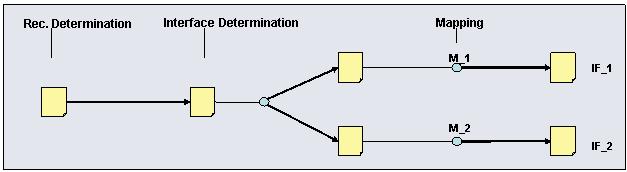
After the interface determination is evaluated, this results in two messages with the same payload at runtime. A different mapping (either M1 or M_2) is executed for both messages and then they are forwarded to the two interfaces (either IF_1 or IF_2) at the receiver.
Multiple Identical Inbound Interfaces with Conditions
Imagine you enter the following interface assignment.
Inbound Interface |
Condition |
Interface Mapping |
IF_1 |
B_1 |
M_1 |
IF_1 |
B_2 |
M_2 |
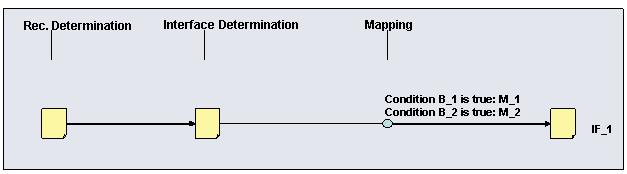
In this case, the conditions are evaluated during the interface determination step. If condition B_1 is true, then mapping M_1 is executed; if condition B_2 is true, then mapping M_2 is executed. The message is forwarded to the same inbound interface at the receiver in both cases. Unlike in the case described above, this does not result in multiple messages with the same payload because only one condition can ever be true at runtime.
Quality of Service (for Multiple Inbound Interfaces)
If multiple inbound
interfaces are assigned by the interface determination, the messages are
forwarded according to the
quality of service
Exactly
Once in Order (EOIO) at runtime. This means that
the order in which the inbound interfaces are entered in the interface
determination determines the order in which the messages are
received.
You can change this default by deselecting the Maintain Order at Runtime checkbox. In this case, the quality of service Exactly Once (EO) is used to forward the message to the inbound interfaces.

We recommend this setting for adapters that do not support quality of service EOIO processing. This setting is also recommended if you want to avoid a single message that develops errors during delivery from stopping all subsequent messages from being delivered.
Example
In the demo scenario Booking a Single Flight (Proxy-to-Proxy), a booking order is sent from a travel agency to an airline. In the specified standard configuration the travel agency communicates with the systems of two different airlines (Lufthansa and American Airlines).
To define the inbound interfaces in both airlines and the interface mapping used for the booking order (from the travel agency), you require two standard interface determinations (each with one inbound interface).