
 Working with Composite Application Services

Purpose
Composite Application Services (CAS) is a component of the Composite Application Framework Core (CAF Core) application structure. It is a graphical tool consisting of service modelers that enable you to model several types of services based on a model-driven architectural approach. It includes both a design time and a runtime component.
The CAS perspective is provided as a plug-in to SAP NetWeaver Developer Studio.
Prerequisites
To be able to understand the CAS perspective, you should be familiar with:
● SAP NetWeaver Developer Studio
● Object-oriented programming
And of course, a basic knowledge of Java is a plus.
Features
You will discover more about the CAS modelers for entity, application, and external services in the following sections, including parts on:
● Service Modeler and Views
● Service Projects
Service Modeler
You use CAS as a service modeling tool to model application, entity, and external services. The service modelers for these services support creation of all kinds of services through data modeling, coding, or a combination of both.
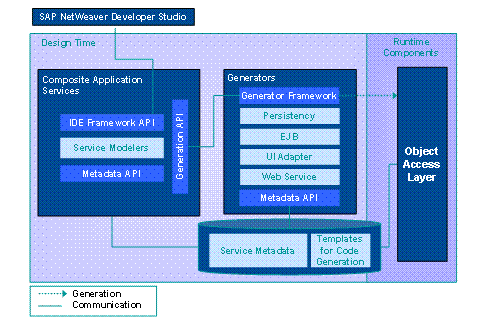
The Composite Application Services perspective consists of two main parts:
● A user interface to create and edit definitions, relationships, and properties of application and entity services and the import of external services (design time).
See: Designing Services in CAF Core
● Several generators to create the source and configuration files out of the metadata definition of an application or entity service (runtime).
The overall architecture is shown in the following figure:
Modeler Views
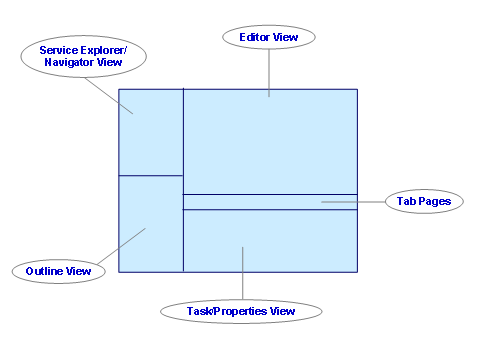
The service modeler perspective is delivered as a plug-in for SAP NetWeaver Developer Studio and contains the following four views (areas):
● Service Explorer/Navigator view
● Editor view
● Outline view
● Tasks/Properties view
Service Explorer/Navigator View
You use the Service Explorer/Navigator view as a starting point for launching the service modeling tools (see figure Composite Application Services Views below). It contains nodes for application, entity, and external services.
You create new application and entity services by choosing the corresponding node, however only external services can be imported.
Editor View
You can use the editor view to edit all services. However, only certain tab pages are available depending on which service you model or import. The tab pages and in which service they are available are listed in table below.
Entity Service |
Application Service |
External Service |
General |
General |
General |
Attributes |
Dependencies |
Operations |
Operations |
Operations |
Configuration |
Persistency |
Implementation |
|
Data Source |
|
|
Permissions |
|
|
Implementation |
|
|
For further information about the tab pages used in the services listed above, see Core Development Tasks → Designing Services in CAF Core → Service Tab Pages.
Tasks/Properties View
You can use the Properties view to edit the properties of application and entity services and their attributes. The Property column lists the service properties and the Value column the field entries of each property. The Tasks view shows the results of tests and any error messages or comments. You can locate this view at the bottom of the screen (see figure Composite Application Services Views below).
Outline View
You can use the outline view to select and sort code while giving you an overview of the code being used. It is available only when the Implementation tab page is displayed. See the figure below for view location on the Composite Application Service perspective layout.
Perspective Views of Composite Application Services
Service Projects
The project you create in CAS is structured to contain all the relevant objects of the application. After you create a project, six other projects are created in the background. Only the “core” project can be used by any composite application and is delivered with CAF Core. The six background projects are:
● Dictionary
● EJB Module
● Metadata
● Enterprise
● Web Dynpro
● UME Permissions
Fore more information about the core project and the other above mentioned projects, see Projects in Composite Application Services.
See next: