
 Dialog-Free Registration of the CCMS
Agents
Dialog-Free Registration of the CCMS
Agents

Use
You can also perform the registration of CCMS agents dialog-free by creating a start file that contains all of the information that you enter during the installation in dialog (see Registering the CCMS Agents in Dialog). You can use any name for this start file. In the following text, it is called CSMCONF. The configuration file is always the same when installing the CCMS agent on more than one server. It therefore makes sense to install the CCMS agent using appropriate software distribution methods and to then configure it automatically.
Features
To have the registration performed dialog-free, use the option -f <file name> to specify the start file from which the system should take all installation information. Save this file in the working directory of the CCMS agent:
Agent |
Installation Call |
SAPCCMSR |
sapccmsr –r -f <file name> [pf=<profile path>] |
SAPCM3X |
sapcm3x -r -f <file name> [pf=<profile path>] |
SAPCCM4X |
sapccm4x –r -f <file name> pf=<profile path> |
Structure of the CSMCONF Start File
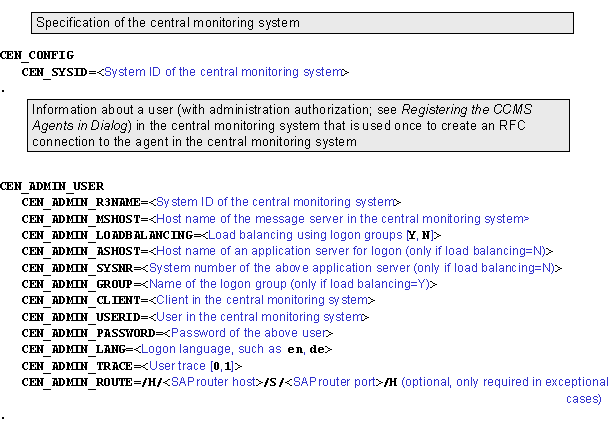

If the connection between the agent and the central monitoring system goes through a SAProuter, specify this router string only in the corresponding input fields (CEN_ADMIN_ROUTE and CEN_CSMREG_ROUTE); do not specify the SAProuter string for the parameters in CSMCONF in which you specify a host name.
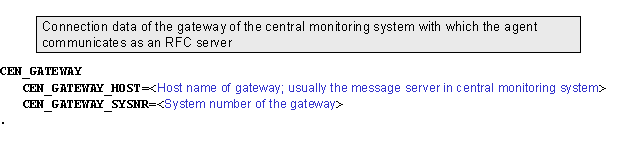
If you are installing the CCMS agent on a Microsoft Windows host, you can optionally specify logon data for the user under which the agent is to run as a Microsoft Windows service. The agent is automatically restarted at every restart. By default, the <LocalSystemAccount> is used for this purpose.

If your central monitoring system has a release status of at least SAP Web AS 6.10, the agents automatically report data to the central monitoring system. To do this, the agent requires an automatically valid logon to the central system (see Registering the CCMS Agents in Dialog) and therefore an additional section in the CSMCONF start file:

For the SAPCCM4X agent, and for agent SAPCCMS with the -j2ee Option, you can optionally assign the monitored system to a system group in the central monitoring system. You require an additional section in the CSMCONF start file to do this (if the monitored system is not to be assigned to a system group, leave the MGDSYSTEM section empty):

The following applies for all sections of the CSMCONF start file:
· Enter the lines in the format <Parameter_name>=<Parameter_value>.
· You must end the section with a period (.). This period must be the only character in the line.
· The passwords CEN_ADMIN_PASSWORD and CEN_CSMREG_PASSWORD are no longer contained in the configuration file in plain text after the registration.
· You can test the generated RFC connection of type T in transaction SM59.
If you are registering the agent with multiple monitoring systems, see Registering with Multiple Central Monitoring Systems.
Example
Example CSMCONF Start File:
CEN_CONFIG
CEN_SYSID=CEN
.
# example: does not use logon load balancing
CEN_ADMIN_USER
CEN_ADMIN_R3NAME=CEN
CEN_ADMIN_MSHOST=cenhostx
CEN_ADMIN_LOADBALANCING=N
CEN_ADMIN_ASHOST=cenhost1
CEN_ADMIN_SYSNR=01
CEN_ADMIN_CLIENT=000
CEN_ADMIN_USERID=user
CEN_ADMIN_PASSWORD=passwd
CEN_ADMIN_LANG=en
CEN_ADMIN_TRACE=0
.
# for logon load balancing, use
# CEN_ADMIN_LOADBALANCING=Y
# CEN_ADMIN_GROUP=PUBLIC
# instead of CEN_ADMIN_ASHOST and CEN_ADMIN_SYSNR
CEN_GATEWAY
CEN_GATEWAY_HOST=host1
CEN_GATEWAY_SYSNR=01
.
# note, CSMREG user should use logon load balancing
CEN_CSMREG_USER
CEN_CSMREG_R3NAME=CEN
CEN_CSMREG_MSHOST=cenhostx
CEN_CSMREG_LANG=en
CEN_CSMREG_TRACE=0
CEN_CSMREG_LOADBALANCING=y
CEN_CSMREG_GROUP=PUBLIC
CEN_CSMREG_CLIENT=000
CEN_CSMREG_USERID=csmreg
CEN_CSMREG_PASSWORD=passwd
.
MGDSYSTEM
.
 CCMS Agents start
page, Installing and
Registering CCMS Agents
CCMS Agents start
page, Installing and
Registering CCMS Agents