
 Understanding the Data History

Use
The history function in the Monitoring service is responsible for keeping track of the past values of each monitor. The history is available for each element registered for monitoring.
The monitoring history provides averaged history values aggregated at several time intervals (Minutes, 5Minutes, Quarters, Hours). For each time interval, aggregated information is available for averages, standard deviation, number of measurements, and extreme with timestamps. You can choose a suitable averaging mode: “arithmetical averaging” or “time weighted averaging”.

The averaging mode can only be
specified in the monitor-configuration.xml file. For more information, see
 monitor-configuration.dtd.
History Architecture

Averaging Strategies
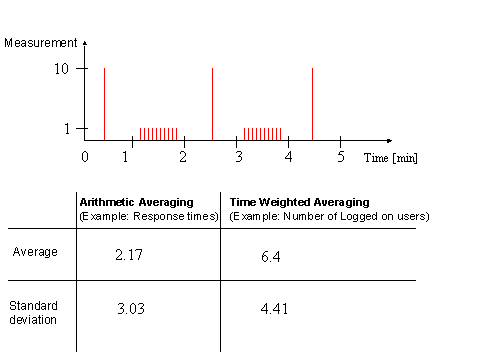
· In the arithmetic averaging, each measurement has an equal effect on the resulting average / standard deviation.
· In the time weighted averaging, many measurements in one time interval are treated as one averaged measurement.
According to these different averaging strategies, you get different average / standard deviation results.
In the case of the “logged on user” example for the “time weighted averaging” shown above, for 3 minutes there were 10 users logged on, and for 2 minutes only one user (even if that user is measured 10 times). So, the average is: (10+1+10+1+10) / 5 = 6.4
In the case of the “response times” example for the “arithmetic averaging”, assume that the measurements have milliseconds [ms] as a unit. Then, you measure (1+10+1+10+1) = 23 requests and they take in the whole (10+10*1+10+10*1+10) ms = 50 ms. This means that one request on average takes: (total response time) / total number of requests = 50ms / 23 = 2.17 ms.