UI Element Guide

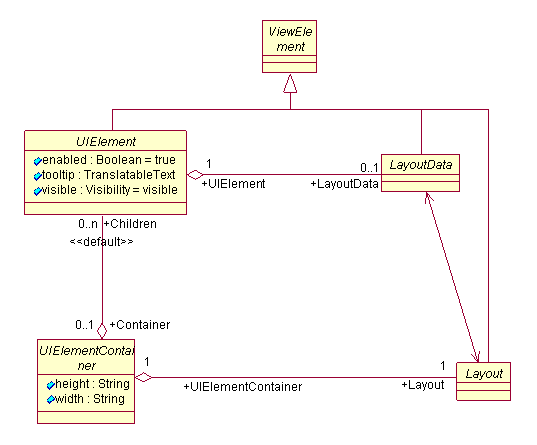
In Web Dynpro, the UI elements are defined as interfaces. All independent elements are derived from the abstract base class IWDUIElement, whereas the aggregated elements are derived from the abstract base class IWDViewElement.
For information on the abstract base classes, refer to the Javadocs. For information on the UI element APIs displayed on the UI, refer to this documentation.

The UI element reference guide is not available anymore and replaced by this structure.
Javadocs
For the reference to the interface, refer to:
● NWDS help under API References or
● the SDN under http://sdn.sap.com/irj/sdn/javadocs.
If you do not have an SDN user, you must register before you can log on.
Assignment of UI Elements to the Libraries
UI Elements |
API Libraries |
com.sap.tc.webdynpro.clientserver.uielib.adobe.api |
|
BIApplicationFrame |
com.sap.tc.webdynpro.clientserver.uielib.bi.api |
BusinessGraphics GeoMap |
com.sap.tc.webdynpro.clientserver.uielib.graphics.api |
RFidReader FunctionKey BarCodeReader |
com.sap.tc.webdynpro.clientserver.uielib.mobile.api |
OfficeControl |
com.sap.tc.webdynpro.clientserver.uielib.officecomp.api |
Layout elements Container Elements Button - ButtonRow BreadCrumb Caption CheckBox - CheckBoxGroup DateNavigator DropDownByIndex – DropDownByKey FileUpload - FileDownload HorizontalGutter Image InputField InvisibleElement Label LinkToAction - LinkToURL PhaseIndicator ProgressIndicator MenuBar and PopupMenu RadioButton - RadioButtonGroups RoadMap Tab - Tabstrip Table and the UI elements it contains TextEdit TextView TimedTrigger Toggle ToolBar – ToolBarItems Tree TriStateCheckBox ValueComparison |
com.sap.tc.webdynpro.clientserver.uielib.standard.api |
For
documentation on mobile add-on elements, see Mobile Web Dynpro
Online.
For documentation on interactive Adobe forms, see Development of
Interactive Adobe Forms for the Web Dynpro UI.
Structure
The following UML class diagram illustrates the relationships between the base classes of UI elements.