
 Back Transports in NWDI

NetWeaver Development Infrastructure (NWDI) lets you set up maintenance landscapes for multiple releases of your software. Each maintenance track produces new locations for the source code of your software. If you need to correct an error in an older release, you may need to do it in multiple tracks to avoid the same error popping up over and over again.
To stop you having to correct errors more than once, NWDI includes a back transport function that you can use to distribute source code changes to all relevant locations (NWDI systems).
Back Transport Connections
Within a track, a back transport connection is configured automatically between the Development and Consolidation systems. This means that corrections in the consolidation system are transported automatically into the development system.

Automatic back transports are particularly useful if you run your complete software lifecycle in a single track, and use the consolidation system for making corrections to the production state of your software. In more complex landscapes (in which a release is developed in multiple tracks), corrections should be made in the consolidation system only in exceptional cases.
For back transports between tracks, you need to configure track connections with the type Repair (see also Track Connections).
The following figure shows you the back transport connections between two tracks. (Since the Test and Production systems are not source code locations, they are not shown, to simplify the figure.)
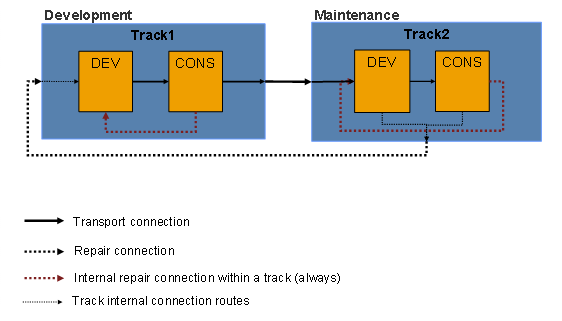
Track 1 and track 2 are connected by a connection with the type Transport. This means that source code from track 1 is transported into track 2. There is also a connection with the type Repair between track 2 and track 1. This means that any corrections made in the development system or consolidation system of track 2 are transported back to track 1, after they have been released.
Process Flow of a Back Transport
1. NWDI triggers the back transport as soon as the activities in the development system in the follow-on track have been released.
Any corrections that you make in the consolidation system are first transported back into the development system, after they are released.
2. The released change requests then appear in the import queue of the target track.
3. You import the change requests into the development system of the target track. The corrections are imported into the workspaces.
The import of the change requests may cause conflicts with current development work. For this reason, transport corrections from a maintenance track into the development track as quickly as possible. Once you have corrected the conflicts or synchronized the source states, you must check in the associated activities, activate them, and release them. The release of the activities starts the further distribution to follow-on tracks.
Cascading Back Transports
When you use transport connections and repair connections to construct a complex track landscape, you can cascade back transports throughout the landscape, right back to the initial track. The following figure shows an example of this.
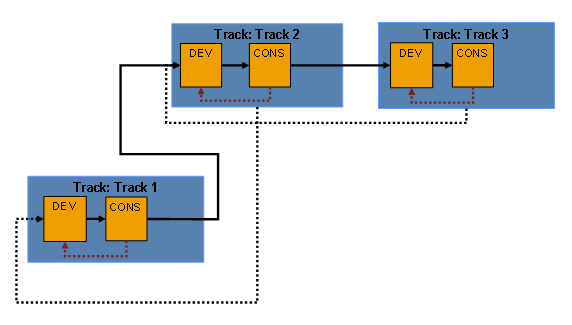
In the example shown here, the correction is first forwarded from track 3 to track 2. The import into development system DEV integrates the correction into the workspaces. Once you have corrected the conflicts or synchronized the source states in track 2, you must check in the associated activities, activate them, and release them. The release action forwards these corrections to track 1, where they are also placed in the import queue for the development system.