Example
Filters
Example
Filters

Typical scenarios for using the Security Audit Log include:
· Recording specific security-critical events, for example, to monitor logon attempts using the standard user SAP*.
· Recording the activities that a specific user executes, for example, to monitor the activities performed by a remote support user.
Filter for Recording All Security-Critical Events
To set up a filter for recording all security-critical events, define a static filter with the following criteria defined:
|
Field or Group |
Entry |
|
Client |
* |
|
User |
* |
|
Audit classes |
Activate all classes |
|
Events |
Select Only critical |
All critical events will be recorded for all users in all clients.
See the graphic below.
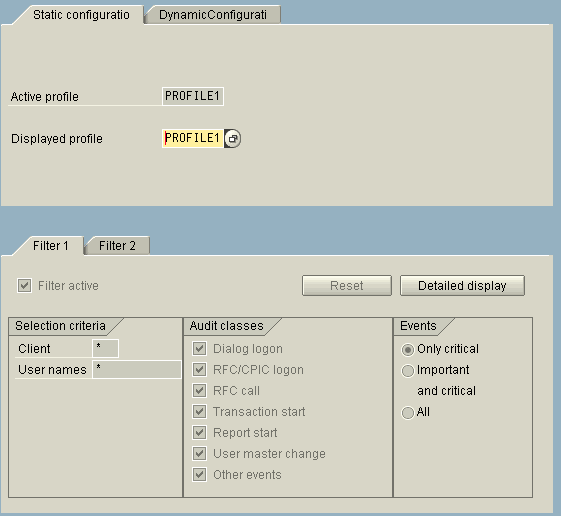

You can define the filter more specifically by choosing individual audit classes or entering more detailed data (for example, by entering SAP* as the User name.) Choose Detailed display to even more specifically define the various events to audit.
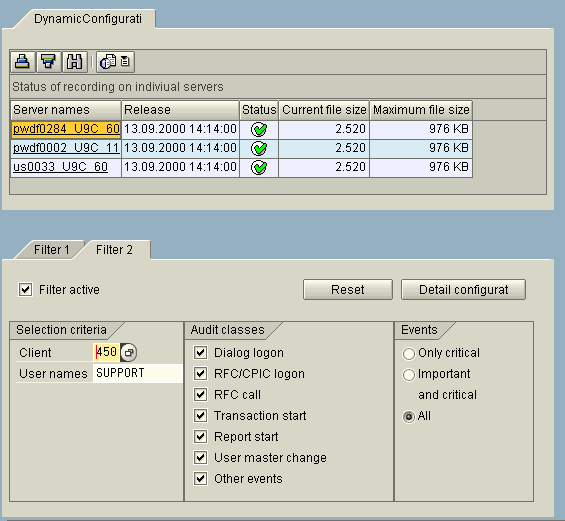
Filter for Recording Activities Performed by a Specific User
To set up a filter for recording security-critical events, define a dynamic filter with the following criteria defined:
|
Field or Group |
Entry |
|
Client |
<client> |
|
User |
<user_ID> |
|
Audit classes |
Activate all classes |
|
Events |
All |
By defining the filter as dynamic, you can activate the filter for the time frame that the user works in the system and deactivate it when the user is finished (for example, for a remote support user).
The graphic below shows a filter that is activated to monitor the activities performed by the user SUPPORT in client 450.