 Starting and Stopping the SAP Web AS J2EE System (Windows)
You use this procedure to start and stop the SAP system after the installation. You can use the SAP Management Console or the SAP NetWeaver Developer Studio to start and stop the SAP system.
You have to start the following components:
Database (SAP DB)
Central Services (Enqueue Service and Message Service)
J2EE instance
Software Deployment Manager (SDM)
Prerequisites
You have administrator rights on the SAP system host.
Procedure
Starting the SAP System using the SAP Management Console
On the SAP system host, choose
 Start
Start  Programs SAP Management Console
  .
.You get the following window:
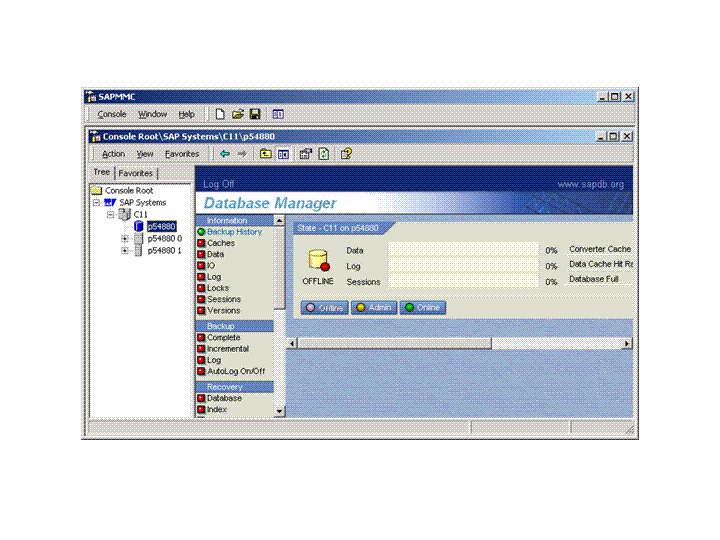
Right-click the SAP system node (C11 in this example) in the left-hand panel and choose Start.
The SAP DB, the Central Services and the SAP J2EE instance start.
 Note
NoteYou can start only the SAP DB as follows:
Select the database node.
In the right-hand panel, the Database Manager is displayed.
In the Database Manager, choose Online.
The database status changes to online (green color).
End of the note.
When the processes are running, you see the following screen:

Monitoring the Status
To display the status of all processes, choose the process list subnode of the required node in the left-hand panel.
The JControl process starts the dispatcher and the server. To display the dispatcher and server status, choose Process Table.
Stopping the SAP System
Choose
Start Programs SAP Management Console .In the left-hand panel, right-click the SAP Systems node and choose Stop.
Starting and Stopping the SAP System in the SAP NetWeaver Developer Studio
You can also start the SAP system from within the SAP NetWeaver Developer Studio.
Prerequisite
The SAP DB is running and online. You can start it using the SAP Management Console (see above) or the SAP Database Manager.
Procedure
Choose
Window Preferences SAP J2EE Engine .Select the option SAP J2EE engine is installed on local host and choose Browse.
You see the system ID of the installed SAP system (e.g. C11).
Select the system and choose OK two times.
In the top menu, choose
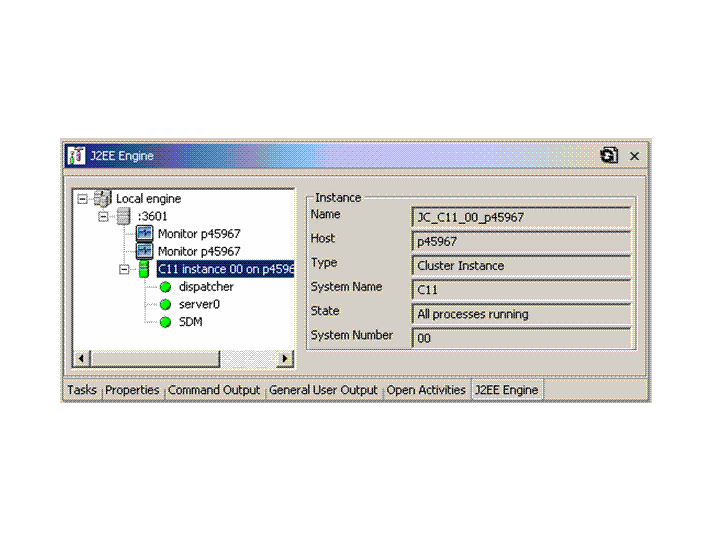
Window Show View Other J2EE J2EE Engine. The J2EE Engine view is opened.
In the J2EE Engine view, right-click the Local engine node and choose Start local engine.
The processes are started.
Click on the
 Refresh tree icon.
In the right panel of the J2EE Engine view, the status of the process is displayed.
More Information
J2EE Startup and Control Frameworkin the Architecture Manual