 Log Area
The log volumes of a database form the log area. The database system permanently stores the redo log entries (after images) in the log area.
The general database parameter MaxLogVolumes specifies the maximum number of log volumes that you can configure for a database (see Database Administration, General Database Parameters).
Log Partitions
To speed up the writing of log entries from the log queues in the working memory to the log area, you can divide the log area into several log partitions. Multiple log writer tasks can then write log entries in parallel to the different log partitions.
To configure the maximum number of log partitions, use the special database parameter MaxLogWriterTasks (see Database Administration, Special Database Parameters).
One log partition can consist of one or multiple log volumes and, if applicable, the related mirrored log volumes. When creating a log volume, you assign it to a log partition. If you do not assign the first log volume to a partition, the system automatically assigns it to the first log partition. Note that later, you cannot move log volumes from one log partition to another.
Usually one log writer belongs to one user kernel thread (UKT) and writes to one log partition.
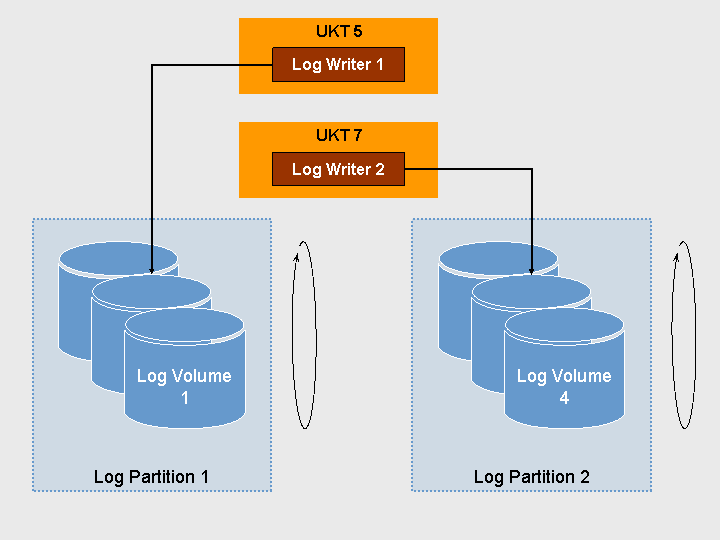
Log Partitions
For more information, see
Database Studio, Configuring Log Partitions, Adding Log Volumes
Database Manager CLI, db_addvolume
How Does the System Write Redo Log Entries?
The system distributes the redo log entries among all the log partitions, and within the log partitions among all the log volumes.
The redo log entries are written to the log volumes by the log writer tasks. The system uses one log writer task for each log partition, which means that log partitions are written in parallel. If the log partitions are on different hard disks, you can thus improve the performance.

Log Partitions
LOG FULL Situation
The system overwrites the log partitions cyclically. However, redo log entries in the log area can only be overwritten once they have been backed up.
If you do not perform any log backups, the database system will at some stage have filled up one of the log partitions with redo log entries, and the database comes to a stand-still. Therefore regularly perform log backups or activate automatic log backup.
Database Administration, Backing Up Log Entries
Database Studio, Activating or Deactivating Automatic Log Backup
Database Manager CLI, autolog_on
 Note
Note
When a log partition is full, you have to perform a log backup. Adding a new log volume does not help: The current write position is usually not the place at which the system adds the new log volume.
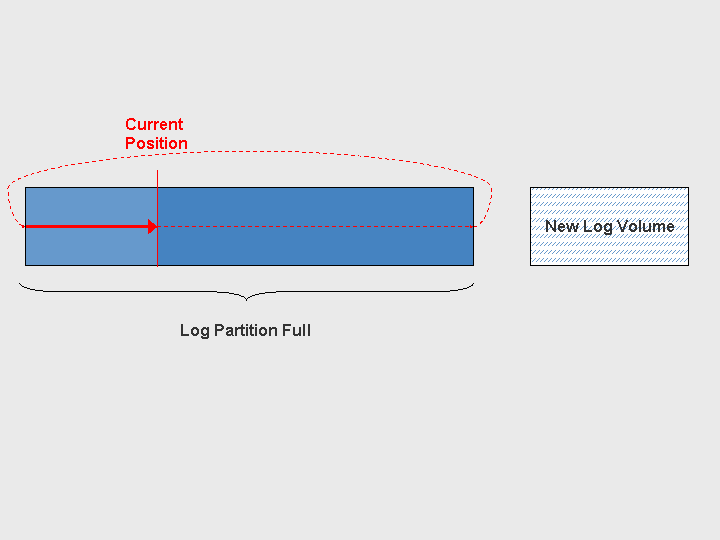
Log partition is full (LOG FULL situation), and the system cannot use a new log volume yet
Log Segments
The system uses log segments for the automatic log backup. After as many redo log entries as were configured in the log segment size were written to the log area, the system starts a log backup (otherwise after the time specified).
You configure the size of the log segments with the general database parameter AutoLogBackupSize. It is unrelated to the size of the individual log volumes, but may not exceed the total of all log volumes. Make sure that enough space remains in the log area when a log segment is being backed up to receive any new redo log entries that are written during the backup (see Database Administration, General Database Parameters).
Overwrite Mode
You can also activate the overwrite mode for the log area. This means that the database system overwrites the log area without first backing up log entries. Note that this interrupts the backup history, and you can no longer restore the database to its most recent state.
 Caution
Only switch on overwrite mode if it is not important to you that you can only restore the system to the status of the last available data backup.
For more information, see
Database Studio, Activating or Deactivating the Overwrite Mode of the Log Area
Database Administration in CCMS, Log Area
Mirroring
For the security of your data, we recommend that you mirror the log area. If hardware-based mirroring is not possible, the database system can mirror the log area (software-based mirroring).
The log mode determines whether the database system mirrors the log area (software-based mirroring).
 Recommendation
Only mirror the log area using this function if hardware-based mirroring is not possible.
For more information, see
Database Studio, Changing the Log Mode
Database Manager CLI, param_addvolume
Database Administration in CCMS, System Settings, Log Area