 Creating a BRMS Connector Expression
Procedure
In the Object Manager panel, under the Detail section, choose the Assigned Objects tab.
The Assigned Objects tab page appears.
Choose Expression from the Type field and choose Create Object.
In the Object Creation dialog box that appears, enter the following data:
Name
Short Text
Text
Choose BRMS Connector in the Type field and choose Create & Navigate To Object.
The newly created BRMS Connector expression appears in the Object Manager panel.
 Note
NoteIf you choose Create, the BRMS Connector expression appears under the Assigned Objects tab.
End of the note.Assign a result data object. You can assign an existing data object or a new data object.
Select an Existing Data Object
Choose
 (Graphical Access).
In the context menu, choose Select Result Data Object.
In the Object Query dialog box that appears, choose the data object and choose Select.
Create a New Data Object
Choose
(Graphical Access).In the context menu, choose Create Result Data Object.
More information: Creating Data Objects
Choose the connection type. You can either choose NetWeaver BRMS Connection or External BRMS Connection.
Choose the destination.
The destination needs to be specified in the rules so that the call can be routed correctly.
Enter the base currency.
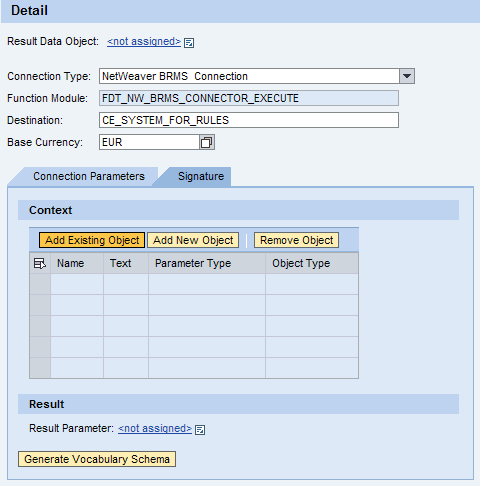
Add context to the expression. You can either add an existing object or create a new object.
Add an Existing Object
Choose Add Existing Object.
In the Object Query dialog box that appears, choose the object and choose Select.
Add a New Object
Choose Add New Object.
The Object Creation dialog box appears.
More information: Creating Expressions
Assign result parameter. You can assign an existing result parameter or create a new result parameter.
Select an Existing Result Parameter
Choose
(Graphical Access).In the context menu, choose Select Result Parameter.
In the Object Query dialog box that appears, choose the data object and choose Select.
Create a New Result Parameter
Choose
(Graphical Access).In the context menu, choose Create Result Parameter.
More information: Creating Data Objects
Choose Generate Vocabulary Schema.
The generated rule XSD is used to define the rule vocabulary in the external BRMS engine.
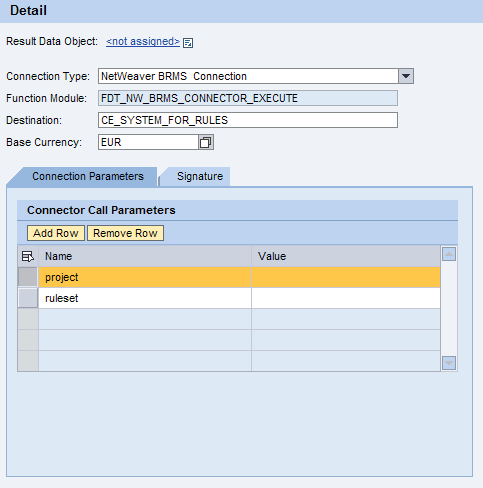
To set connection parameters, choose Connection Parameters tab.
Under the Connector Call Parameters section, enter values for the project and the ruleset.
Save the expression.