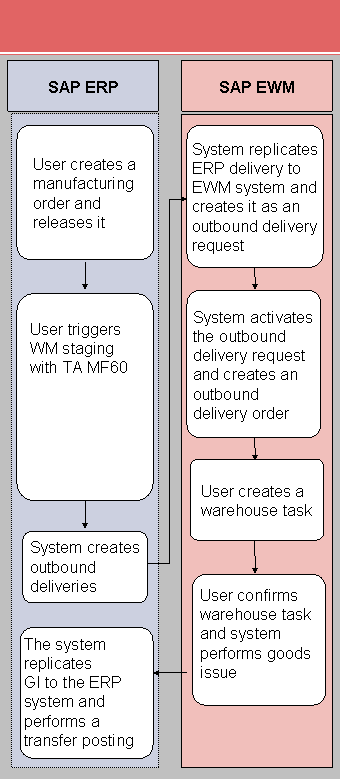
Process Flow for Release Order Parts Using Inventory-Managed (MM-IM) Storage Location (R3)
In this process, you stage the release order parts using transaction MF60. The production supply delivery does not contain an order number. The ERP system does not update the component reservation.
For more information about the confirmation, see SAP Library under  SAP ERP Central Component
  Logistics Logistics Execution (LE) Integration of Extended Warehouse Management Processes in Production and Process Order Production Order Confirmation
  .
.
Process
You execute most of the process steps of the following process manually. To a large extent, you can also automate the process to match your requirements.
Create a manufacturing order in the ERP system (transaction CO01 or COR1), and save it. Choose
Logistics Production Shop Floor Control Order Create. Release the manufacturing order.
Activate staging for the products using transaction MF60. In the ERP system, choose
Logistics Production Shop Floor Control Goods Movements Material Staging Pull List. You determine and check the outbound delivery using the ERP delivery number or the product, for example. To call transaction /SCWM/PRDO, choose
Extended Warehouse Management Delivery Processing Outbound Delivery Maintain Outbound Delivery Order. Create a warehouse task for the outbound delivery order.
Confirm the warehouse task.
The following is a graphical representation of the process: