 Customizing Projects


Customizing Projects
SAP Systems are implemented by several company project teams which each perform one or more customizing projects.
There are two kinds of customizing projects:
The project administrator determines the project scope by selecting the countries and functions which he or she wants to include in the customizing project, from the SAP reference IMG. The result of this selection is the project IMG, a subset of the
The project administrator creates release-specific

You can create any number of Project IMGs and any number of views for each Project IMG. Customizing projects should not overlap. If there are minor overlaps, follow the project transport rules.
See
 transport control by project.
The graphic below shows how projects are generated from the SAP Reference IMG.
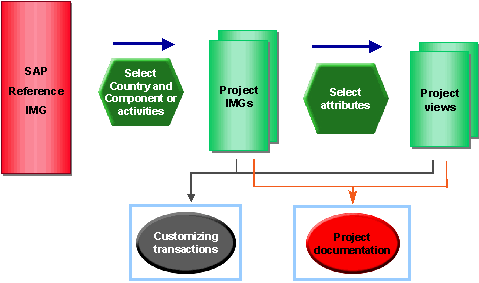
The Customizing project provides project-specific project documentation, status information and views of the SAP Reference IMG.