 Job States
Job states are there to show which stage a job has reached. There are four basic stages in which one can classify the various job states.
initial
pre-running
running
final
Every job goes completed job went through all four stages, however, a job cannot "revert" back to a previous stage. For example, a Running job cannot return to a pre-running stage status.
Initial Job States
Status |
Description |
New |
The process has been submitted, but not yet validated. |
Chained |
A job chain is requested and all jobs in the chain have been created and are awaiting execution |
Disabled |
The process server will not execute the call in a job chain due to a manual request of the user; when the job chain is restarted, calls that have the status Disabled will not be executed. |
Pre-Running States
Status |
Description |
Scheduled |
The process has a valid start time and is waiting for execution |
QueueHeld |
The processes Queue has been manually paused |
Held |
The execution of the process has been manually paused. |
EventWait |
The process is waiting for an Event to be raised. |
LockWait |
The process cannot obtain a process lock and is waiting for one to be released. |
Queued |
The start time is known, but the process cannot (yet) be executed. |
Dispatched |
The process has been dispatched to a Service, but the Service has not yet started the process. |
Assigned |
The process has been accepted by the Service, but it has not been started yet. |
Running States
Status |
Description |
Running |
The process is being executed by the Service. Once it has entered this state, the JobService that is running this job no longer needs any access to the JobParameters of this Job. |
Waiting |
The process is waiting for the result of the execution of another process. |
Killing |
A request was made to kill the process and the JobService has honored that request. |
Canceling |
A request was made to cancel the process and the JobService has honored that request. |
Console |
The process has issued an OperatorMessage to the Messages monitor and is waiting for a reply. |
Final States
Status |
Description |
Completed |
Process execution finished successfully. |
Error |
The execution of the process failed. |
Killed |
The process was terminated while it was running (process status was Running, Waiting or Console). |
Canceled |
The process was terminated before execution commenced. |
Skipped |
The process server has not executed the call in a job chain due to a pre-condition or the usage of the "Start at specified step" scheduling parameter. When the job chain is restarted, the process server will re-evaluate calls with the status SKIPPED. |
Ignored |
This process was ignored as a result of being Disabled when the job chain was called. |
Unknown |
The Service was terminated while the process was running (process status was RUNNING, WAITING or CONSOLE). |
Special States
Status |
Description |
Modified |
The parameter list of a job in a job chain have been modified - the process server cannot proceed with the job execution because not enough parameter values are available - operator intervention is required. |
Never |
Due to conflicting time windows, time window elements or a shutdown process server, the process shall not execute for at least two years. The start time is set to December 31st 2999 |
Overdue |
The process did not run in the first time window opened after the process start time |
Delayed |
The child process is waiting for the parent process to finish |
 Note
Note
It can occur that the Job gets deleted in the SAP system before the final status has been retrieved by SAP CPS. In this case, the job will get status Unknown in the Job Monitor.
Diagrams
Understanding Status changes
A simple job would pass the stages below, in fact, not all states are displayed here, most of the time you will not see jobs in status New, Dispatched, or Assigned as these states are transitional and are immediately reacted upon:

Job states of a completed job
Wait events and locks force the job to wait until all wait events are raised or until the lock is released:

Job states of a job that waited on an event

Job states of a job that waited for a lock
Jobs that have not yet reached the Running status can be canceled; jobs that have reached the Running status and not yet reached a final status must be killed if you want to interrupt them. When you cancel or kill a job, the job will remain in one of the two transition states Canceling or Killing for a short time, depending on the system load, before it reaches its final status.

Job states of a canceled job

Job states of a killed job
Job chains
A submitted job chain consists of the following jobs:
a job for the chain itself
a job per step
a job per call
A basic job chain with one step and one call that got submitted has three jobs.
When a job chain is submitted, job chain steps and job chain calls will remain in status Chained or Disabled until they are started. Disabled Jobs immediately reach status Ignored when the process server processes them. Disabled and Ignored steps have been disabled by an operator.
You can skip jobs by submitting a job chain at a specific step. All jobs that would have been executed before the step in question will be skipped. Precondition functions can be used to have specific jobs run at specific times only. For example, a job chain that runs every day could have one or more jobs with a precondition restricting these jobs to run only on Mondays. The job chain would run every day, the jobs that were to run on Mondays will be Skipped on other weekdays.
By default, a job chain job will wait until all its child-steps have completed successfully or a child-step completed unsuccessfully. Steps will wait in the same way for their calls. You can use Status Handlers to customize this behavior.
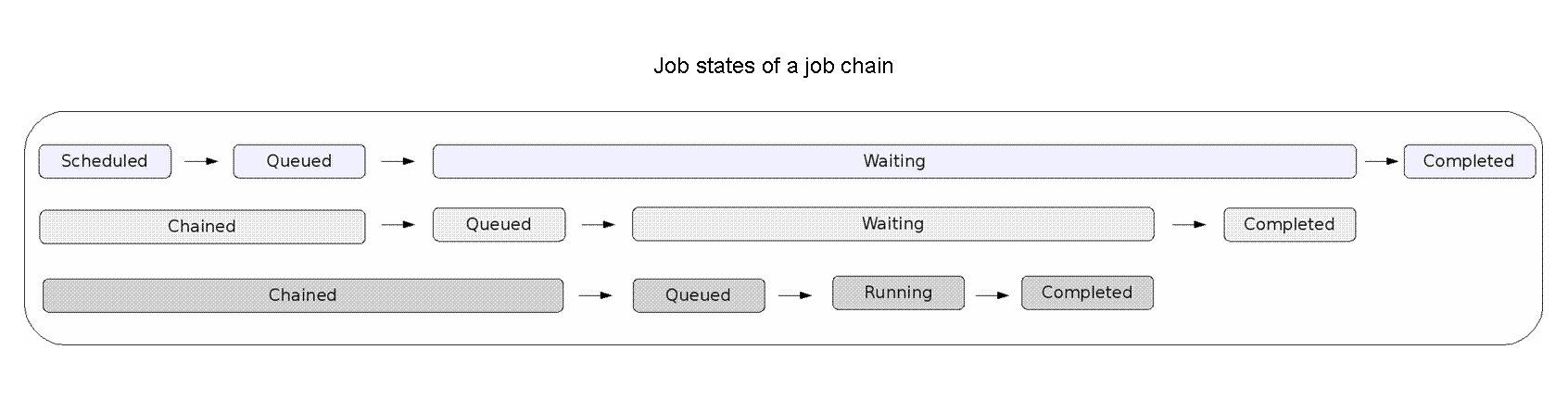
Job states of a job chain
By default, when you kill or cancel a job chain step or a job chain call, the main job chain job will be set to status Error. You can use Status Handlers to customize this behavior.