 Cost Analysis
This analysis scenario enables portfolio managers and project controllers to display informative and accurate reports about how much budget has been allocated to any given portfolio item, as well as compare it to the planned and actual costs for a specific period of time. These reports also identify the variances and help decide how to minimize those variances.
Operational financial data are uploaded to the portfolio and prepared for comparison of planned and actual data. The retrofitted reports from xRPM 2.0 include:
Actual vs. Planned Cost by Portfolio Item: Displays tabular information about the actual and planned costs of the portfolio item and the variances.
Details Actual Cost by Portfolio Item: Tabular cost data for selected portfolio items by cost object type
This scenario delivers its business content in the Cost AnalysisInfoCube from which you can generate intuitive analytics.
Integration
OLTP Release |
As of SAP xRPM 1.0 SP 2 |
BW Release |
As of SAP BI Content 3.2 Add-On |
Features
Data Flow for Analysis Scenario Cost and Time Analysis
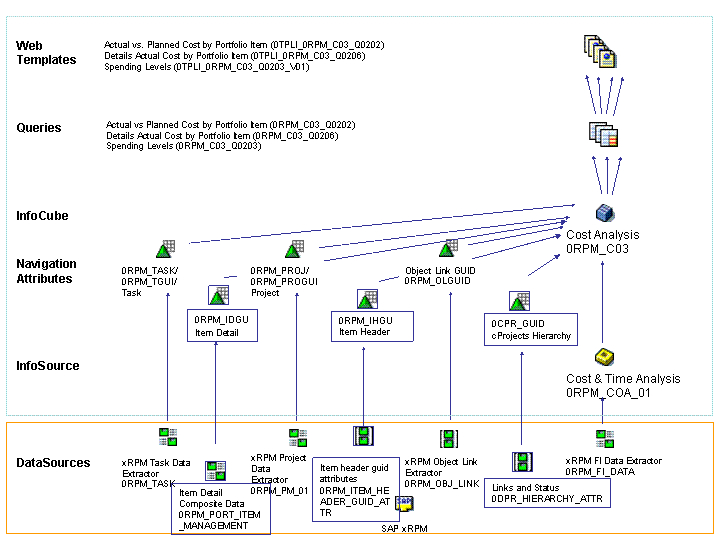
Data is imported using the InfoSource Cost and Time Analysis (0RPM_COA_01).
The data is updated to the InfoCube Cost Analysis (0RPM_C03).
The following queries are used:
Actual vs. Planned Cost by Portfolio Item (0RPM_C03_Q0202)
Details Actual Cost by Portfolio Item (0RPM_C03_Q0206)
Spending Levels (0RPM_ C03_Q0203)
The following Web Templates are used:
Actual vs. Planned Cost by Portfolio Item (0TPLI_0RPM_C03_Q0202)
Details Actual Cost by Portfolio Item (0TPLI_0RPM_C03_Q0206)
Spending Levels (0TPLI_0RPM_C03_Q0203_V01)
 Note
NoteObsolete queries and Web templates are not included in the above data flow diagram.
End of the note.