 Partner-Dependent Network Filter
In the standard system, the partner-dependent network filter is a selection mode that is set for all customer collaboration applications and for selected supplier collaboration applications. These include the Alert Monitor or applications for the SMI scenario, for example. The user can see the following master and transaction data with this selection mode:
All locations of the assigned business partner
All location products in locations of the assigned business partner
All transportation lanes for which a location of the business partner is either ship-to location or ship-from location
All location products in other locations for which a transportation lane is defined with a location of the business partner
All business partners, to whom locations belong, for which a transportation lane is defined with a location of the assigned business partner
Alerts for the named objects
The following additional restrictions apply depending on the selected view:
The supplier view only displays data for products for which the assigned business partner is supplier.
The customer view only displays data for products for which the assigned business partner is customer.
 Note
Note
We deliver the selection modes PDNF
and PDNF_NEW
as partner-dependent network filters. Depending on the application, the standard system uses the PDNF
or the PDNF_NEW
selection
mode. For more information, see Customizing for Supply Network Collaboration
under 
Basic Settings

Visibility
Display SAP Default Selection Modes of Application
 .
.
Example
The following figures show which master data can be seen by a user who is assigned to business partner A.
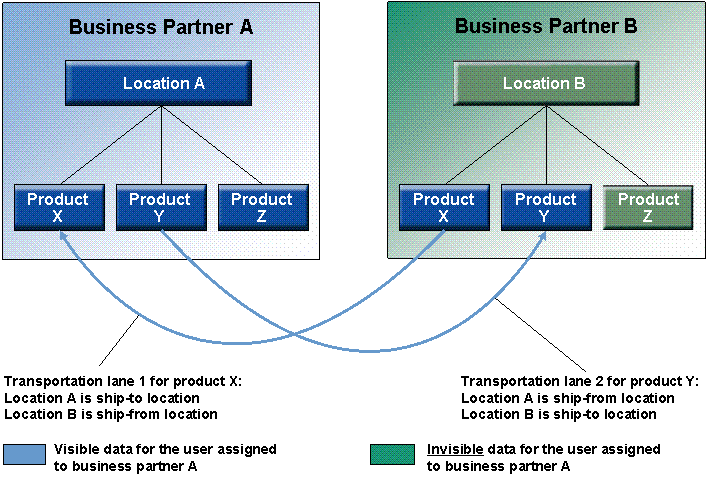
Calling SAP SNC in the Overall View
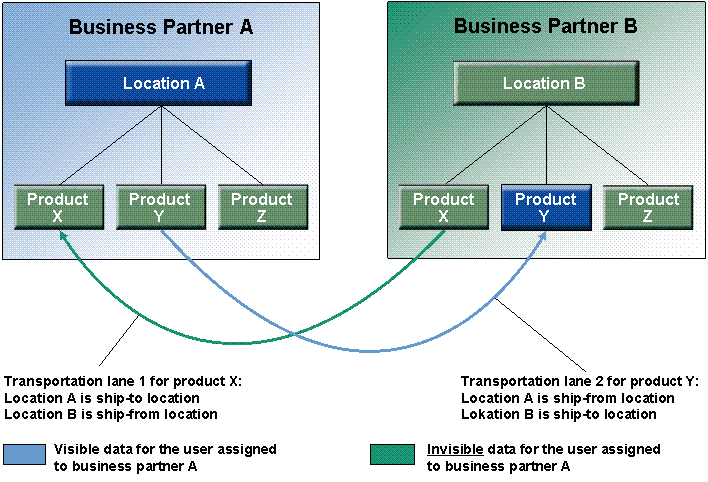
Calling SAP SNC in the Supplier View

Calling SAP SNC in the Customer View