 Push Deployment (PD) and Pick from Goods Receipt (PFGR)
Push deployment (PD) and pick from goods receipt (PFGR) are opportunistic cross-docking processes. For an opportunistic cross-docking process, you work with standard inbound deliveries and start by using the standard goods receipt process. When you post goods receipt, Extended Warehouse Management (EWM) checks whether the warehouse process type and stock type are relevant for putaway delay. If they are relevant, EWM starts the putaway delay. As a result, EWM delays the automatic generation of the warehouse tasks for the putaway initiated via PPF. If the warehouse process type and stock type are not relevant, EWM automatically generates the warehouse tasks for putaway without delay. This means that EWM does not perform PD or PFGR.
SAP Advanced Planning & Optimization (SAP APO) defines whether an inbound delivery is PD-relevant or PFGR-relevant. This means that SAP APO defines the cross-docking relevance after posting goods receipt.
Push Deployment (PD)
You use PD so that you can react to requirement changes and requirement bottlenecks in your warehouse quickly and flexibly. You can use PD to execute stock transfers for delivered products from one warehouse to another at short notice, without having to put away the goods. For more information about push deployment in service parts planning, see SAP Library for SAP Supply Chain Management (SAP SCM) under  SAP Supply Chain Management (SAP SCM)
  SAP Advanced Planning and Optimization (SAP APO) Service Parts Planning (SPP) Deployment
  .
.
For more information about push deployment in SAP ERP, see the SAP Help Portal for SAP ERP Central Component unter SAP ERP Central Component Logistics Logistics - General (LO) Service Parts Management (LO-SPM) Transportation Cross-Docking Push-Deployment .
Pick From Goods Receipt (PFGR)
In PFGR, you can confirm a sales order that is not yet confirmed via the ATP check by posting goods receipt for an inbound delivery. You can perform this picking from directly within the goods receipt area; unlike the standard pick procedure, you do not have to put away the products.
For more information on picking from goods receipts within the framework of the global ATP, see the SAP Library for SAP Supply Chain Management (SAP SCM) under Pick from Goods Receipt.
Prerequisites
You have a system landscape in which you are using EWM, SAP APO and SAP Customer Relationship Management (SAP CRM).
You have performed the corresponding Customizing in SAP APO. For more information on picking from goods receipts within the framework of the global ATP, see the SAP Library for SAP Supply Chain Management (SAP SCM) under Pick from Goods Receipt.
You have performed Customizing for push deployment (PD) or pick from goods receipt (PFGR). For example, you have defined your own document types for the outbound delivery and your own warehouse process types if necessary. For more information, see Customizing for EWM under
Cross-Process Settings Cross-Docking (CD) Opportunistic Cross-Docking Basic Settings for PD and Pick From GR . Note
NoteIf you want to work more quickly with CD-relevant inbound deliveries, such as searching for CD-relevant inbound deliveries, we recommend that you define separate warehouse process types in Customizing.
For more information, see Customizing for EWM under
Cross-Process Settings Warehouse Task Define Warehouse Process Type .End of the note.You have defined the mapping of the document types from SAP ERP in EWM. For more information, see Customizing for EWM under
Interfaces ERP Integration Delivery Processing Map Document Types from ERP System to EWM .You have defined a putaway delay for PD or PFGR. For more information, see Customizing for EWM under
Cross-Process Settings Warehouse Task Define Putaway Delay .If you want EWM to generate pick-warehouse or putaway tasks automatically, you have performed the corresponding Customizing in EWM, namely Post-Processing Framework action /SCWM/PRD_OUT_TO_CREATE Create Warehouse Task for Stock Removal. For more information, see Customizing for EWM under
Cross-Process Settings Delivery Processing Actions .For more information, see Opportunistic Cross-Docking.
Process
The following gives you an overview of the process flow in EWM for PD and PFGR. The process for PD and PFGR is largely identical in EWM. The only differences between the processes occur between the start of event-driven quantity assignment and the time when SAP ERP generates the related outbound deliveries.
The stock allocation of an inbound delivery follows the following principle:
SAP APO starts by checking whether PFGR is required for the entire stock. EWM generates one or more related outbound delivery orders, if required.
SAP APO checks whether PD is required for the remaining stock. EWM generates one or more related outbound delivery orders, if required.
The standard putaway process runs for the remaining stock, and EWM generates one or more related outbound delivery orders.
If SAP APO decides that neither PFGR nor PD is required, the remaining stock and stock to be put away can correspond to the inbound stock.
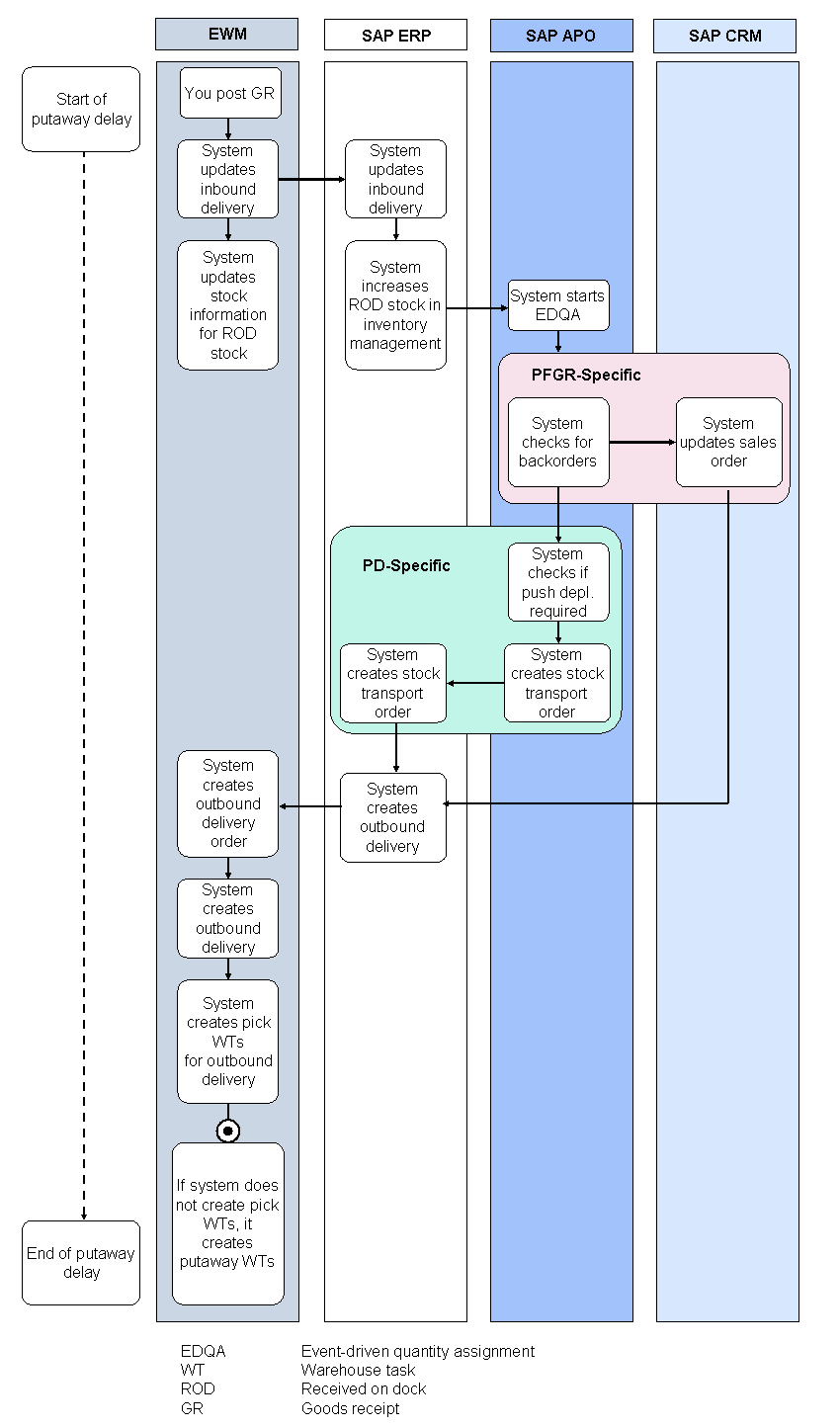
Process Flow in EWM for PD and PFGR
The figure above shows you the process flow in EWM for PD and PFGR.
You receive an inbound delivery and post goods receipt (GR) in EWM.
NoteIf you are posting goods receipt, you must have authorization to schedule jobs. EWM uses this user authorization to schedule the job for putaway delay.
End of the note.You can post goods receipt before unloading a transportation unit or vehicle. If you are working with unloading warehouse tasks, EWM posts the goods receipt at the latest when confirming these unloading warehouse tasks. EWM does not automatically generate a putaway warehouse task until the putaway delay has expired.
NoteWe recommend that you post goods receipt before unloading. This allows EWM to call push deployment with the added up quantities from the vehicle. This enables you to make an informed decision regarding replenishment.
End of the note.When you post GR, the putaway process begins in EWM for the decision in SAP APO as to whether EWM is to execute PD or PFGR.
If SAP APO sends this decision to SAP ERP within the putaway delay, SAP ERP reserves the required stock and informs EWM about this decision. If EWM is to perform PD or PFGR, it must generate the pick-warehouse tasks during the putaway delay due to the decision made in SAP APO.
If SAP APO sends this decision to SAP ERP after the putaway delay, EWM receives it too late. EWM attempts to generate pick-warehouse tasks, but the system is unable to find any free stock. The free stock has already been assigned to putaway warehouse tasks.
EWM updates the inbound delivery and its stock for received on dock (ROD stock). EWM sends the updated inbound delivery to SAP ERP.
SAP ERP updates its corresponding inbound delivery. It increases its ROD stock within inventory management.
Inventory management in SAP ERP uses the APO Core Interface (CIF) to send the absolute and the new stock to SAP APO.
Inventory management calls SAP APO for each goods movement, and informs SAP APO about the stock change.
SAP APO maps the SAP ERP stock type to an SAP APO ATP category.
NoteSAP predefines the assignment between the SAP ERP stock type and the ATP category. You cannot perform Customizing for this assignment.
End of the note.SAP APO starts event-driven quantity assignment (EDQA).
For more information, see SAP Library for SAP Supply Chain Management (SAP SCM) under
http://help.sap.com SAP Supply Chain Management (SAP SCM) SAP Advanced Planning and Optimization (SAP APO) Global Available-to-Promise (Global ATP) Functions of the Redistribution Event-Driven Quantity Assignment (SCM-APO-ATP-EQA) .SAP APO checks whether a PFGR or a PD is necessary.
The following describes the process of this check in detail.
SAP APO informs SAP CRM of the unconfirmed sales orders. SAP CRM informs SAP ERP that an outbound delivery is now to be generated for these sales orders.
SAP ERP generates an outbound delivery and checks whether stock belonging to stock category received on dock (ROD stock) exists for this outbound delivery. This means that SAP ERP looks for stock in the goods receipt area. SAP ERP informs EWM about the outbound delivery.
If SAP CRM does not require the entire stock of the inbound delivery for PFGR or no unconfirmed sales order exists, SAP APO checks whether PD is required for the remaining stock.
If PD is necessary, SAP APO generates a stock transport order and informs SAP ERP accordingly.
EWM generates one or more related outbound delivery orders, outbound deliveries for outbound delivery orders, and pick-warehouse tasks for outbound deliveries, depending on the decisions made in SAP APO.
You execute picking.
If no backorder exists, or if neither PFGR nor PD is required, SAP APO does not report anything to SAP ERP. After the putaway delay has passed, EWM performs the standard putaway process for the remaining stock, meaning it generates putaway warehouse tasks.
Result
SAP APO has checked whether PFGR or PD is required, and triggered the necessary steps in SAP CRM and EWM where required.
EWM has generated related outbound delivery orders and pick-warehouse tasks, corresponding to the decision in SAP APO.
If EWM has determined that the system has not assigned the entire stock for PFGR or PD, then EWM has generated standard putaway warehouse tasks for the inbound delivery. You execute the required putaway activities (see Putaway) for these putaway warehouse tasks and confirm the putaway warehouse tasks.