 Reusing Objects


Reusing Objects
One of the main advantages of IMG structure maintenance is that you can reuse all elements of an IMG activity. You can include a complete IMG activity in the IMG structure as often as you like, or reuse certain parts of an IMG activity (documentation, attributes and maintenance object). Enter the object ID in the ID field.
 Reuse of objects example:
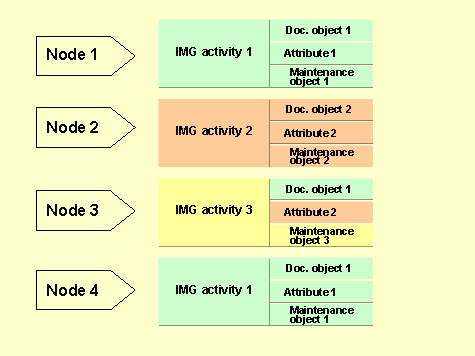
Nodes 1 and 2 have different IMG activities with their own documents, attributes and maintenance objects. Node 3 contains another IMG activity which comprises the documentation of activity 1, the attributes of activity 2 and its own maintenance object. Node 4 does not have its own IMG activity, the complete activity which is assigned to node 1 is also assigned to node 4.

When you edit an activity or its objects:
The changes affect all nodes which use the object. If you want to reuse an existing IMG activity, the system warns you that it is also used by other nodes.
Check the where-used list before changing attributes or maintenance objects, to see whether the object is used in other nodes. If this is the case, ensure that your changes do not violate the requirements of the other nodes. If in doubt, create a new object.
Object where-used lists
You can create a where-used list for an IMG activity, attributes and maintenance objects, to determine whether an object is used more than once in an IMG structure.
Proceed as follows:
Attribute where-used list |
Maintenance object where-used list |
IMG activity where-used list |
|
|
|
You can display a list of existing attributes in the possible entries help. |
You can display a list of existing maintenance objects in the possible entries help. |
You can display a list of existing IMG activities in the possible entries help. |
|
|
|