
 Mapping Operations and Attributes at
Runtime
Mapping Operations and Attributes at
Runtime

Use
You can map operations and attributes from entity services to external services at runtime. The concepts of mapping at runtime are the same as mapping at design time, the difference is only in the user interface. All rules and restrictions for mapping at design time are valid for mapping at runtime.
Prerequisites
You have completed all prerequisites for mapping at design time. Fore more information, see Service Mapping → Mapping Operations.
Procedure
1. Select an Operation to Map
1. Launch the External Services Configuration tool at http://<host>:<port>/caf → Administration Tools →External Service Configuration.
2. Choose Business Entities from the left pane.
3. Search for a business entity located on the J2EE.
○ For easier searching, you can choose only entities from a particular application to be displayed. To do this, select the application name from the drop-down menu.
○ You can also directly enter the name of the business entity in the field Name.
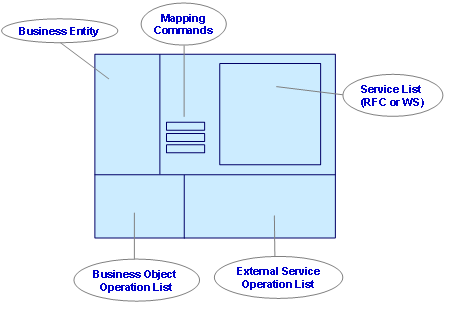
4. In the Business Entity Operations Mapping screen, you can see:
○ a hierarchical list of the business entity operations and attributes available for mapping
○ a set of buttons for creating or deleting mappings (mapping commands)
○ a hierarchical list of the external services and their operations and attributes (service list containing RFCs or WSs)
○ a list of created mappings between entity and external services
You can see how the layout is divided in the figure below.
You can also easily determine the type of each item by using the table below.
Icon |
Item Type |
|
Business entity service |
|
External services collection (RFC or WS) Can be one of the following: ● SAP Remote Function Call ● Web Service (WSDL 1.1) |
|
External service |
|
Operation or attribute that is mapped already |
|
Business entity operation |
|
External service operation |
|
External service message part. Message parts are used only for subsidiary purposes. |
|
Composite attribute |
|
Simple attribute |


2. Map Operations
1. Select the business entity operation you want to map from.
2. Select the external service operation you want to map to.
3. Choose Map Operations.
To delete a mapping that you have already created, select it from the Existing Mappings List and choose Reset/Delete Mapping.
4. Enter a number in the field Maximum Count for Query Results.

This number restricts the results returned when executing a query. Leaving the default set to 0 could create a performance bottleneck when retrieving data from backend systems because then no limit has been to set to control how many results can be returned.
For more information about which facets are supported, see Services and Concepts → External Services.
3. Map Attributes
1. Select the operations mapping from the Existing Mappings List.
2. Choose Map Attributes.
A list of operations attributes opens.
To switch between input and output mapping, choose the relevant tab pages on the top of the pane:
■ Input Parameters – for input mapping
■ Output Parameters – for output mapping
3. Select the business entity attribute you want to map.
4. Select the external service attribute you want to map.
5. Choose Map.
To delete a mapping that you have already created, select it from the parameters list and choose Delete Mapping. You can also set default mapping values by disabling the Is null checkbox and entering data in the Default Value field.
For more information about default values, see Mapping Attributes.