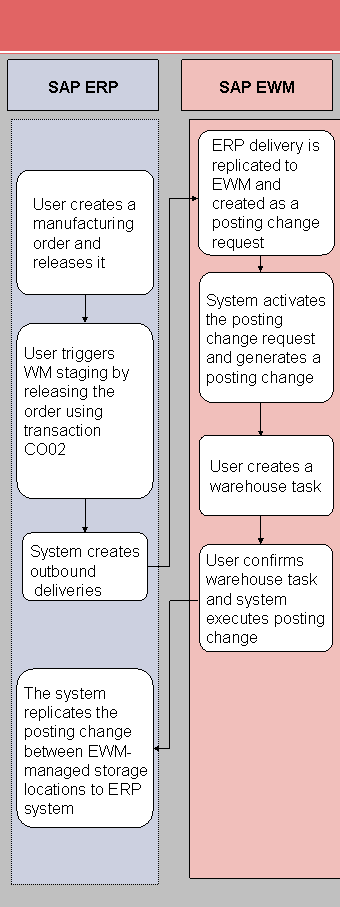
Process Flow for Pick Parts Using Two EWM-Managed Storage Locations (P1)
In this process, a manufacturing order in the ERP system triggers the production supply. The ERP system creates a production supply delivery, and replicates it to the EWM system. From the EWM perspective, the production supply delivery is a posting change. In the EWM system, this contains important information for the production supply, such as the following:
Production supply area (PSA)
Order number
Source and target stock types
The user creates the warehouse tasks for the material staging with reference to the production supply delivery. Alternatively, the PPF action can also trigger this automatically. When executing the warehouse tasks, a warehouse specialist stages the components to the storage bin of the PSA assigned to these components. Since the stock of the PSA belongs to another storage location (= separate stock type in EWM), the EWM system performs a posting change, and sends this on to the ERP system (movement type 411 — Posting change storage location to storage location).
Subsequently, confirming the manufacturing order in the ERP system triggers the creation of an outbound delivery for the consumption posting. This contains the information about the PSA, meaning that for each component the EWM system determines the storage bin of the PSA from which goods issue is to be posted.
The standard setting is for the system to process the consumption posting automatically, without any user interaction.
For more information about confirmations, see SAP Library under  SAP ERP Central Component
  Logistics Logistics Execution (LE) Integration of Extended Warehouse Management Processes in Production and Process Order Production Order Confirmation
  / Processes in Repetitive Manufacturing Final Confirmation .
Process
You execute most of the process steps of the following process manually. To a large extent, you can also automate the process to match your requirements.
Create a manufacturing order in the ERP system (transaction CO01 oder COR1), and save it. Choose
Logistics Production Shop Floor Control Order Create. Release the manufacturing order.
Activate staging for the products (transaction CO02 or COR2). Choose
Logistics Production Shop Floor Control Order Change. The ERP system then generates an outbound delivery with a reference to the manufacturing order.
This outbound delivery is automatically replicated to the EWM system, where it is created as a posting change request.
The EWM system activates this posting change request, and generates a posting change from it.
You use the manufacturing order number to find and check the posting change. To call transaction /SCWM/IM_PC, choose
Extended Warehouse Management Delivery Processing Posting Change Maintain Posting Change. Create a warehouse task for the posting change. Choose
Extended Warehouse Management Work Scheduling Create Warehouse Task for Warehouse Request Stock Removal for Posting Change. Confirm the warehouse task. This triggers the posting change. Choose
Extended Warehouse Management Execution Confirm Warehouse Task. The EWM system replicates this goods movement to the ERP system.
In the ERP system, a posting change from the issuing storage location to the receiving storage location takes place with reference to the ERP outbound delivery.
The following is a graphical representation of the process: