 Release Planning
You can use release management to plan, manage, and coordinate your release activities. It comprises release planning and the subsequent execution of the planned activities. The release planning function in SAP Solution Manager is used to plan major and minor releases, specify go-live dates, and assign the release planning data to branches. Release cycles can only be created from the release planning function. Releases are defined for change control landscapes.
 Note
Note
Change control landscapes are always required for release management since each release cycle is assigned to a change control landscape. Change control landscapes consist of logical component groups, and for each change control landscape, independent releases can be planned. You can use the same set of logical component groups for several change control landscapes. For example, there can be a logical component group “CRM” with different releases for CRM Sales and CRM Marketing.
When planned activities are executed for a release, IT requirements, requests for change, and change documents are created and assigned to release cycles. When a release goes live, only the changes that have been successfully tested are imported into the production system, depending on their status. Change documents that are not finished are automatically reassigned to the successor release and will be imported into the production system with the go-live of the successor release. If there is no successor release cycle, the system automatically creates a release cycle.
You have various ways of defining your releases:
In a dual landscape, you can perform the activities for your minor releases in the maintenance landscape (maintenance branch), and for your major releases in the development landscape. In a single landscape, the activities for both major and minor releases must be performed in the same branch.
For different change control landscapes (products, scenarios, or business contexts) you can define different major and minor releases. You can define releases that contain features and changes of all your change control landscapes or you can define individual releases for each change control landscape
You can plan releases for different scenarios, for example, sales, marketing, and billing.
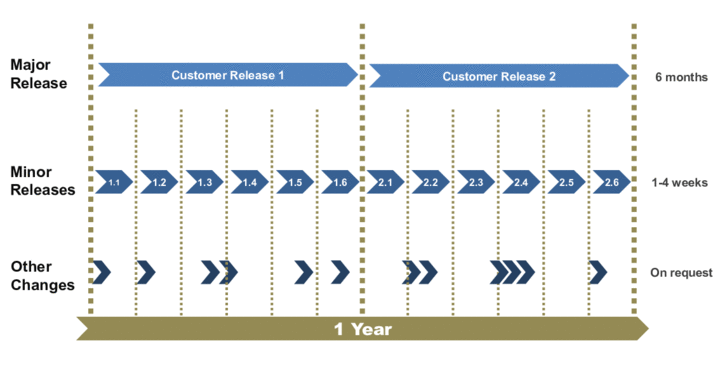
The following graphic provides an overview of major and minor releases within release management:
Differences Between Release-Based Change Management (Release Management) and Change Request Management
The following table shows the differences between release management and project-based change request management:
Release Management | Project-Based Change Request Management | |
|---|---|---|
Differences |
|
|
Benefits |
|
|
Note
We do not recommend that you use project-based change request management and release management in the same landscape.
Prerequisites
You have maintained your solution landscapes, your change control landscape, and your branches, and you have assigned your logical components to your branches. For more information, see Solution Documentation.
Features
You can use the following functions:
Define major and minor releases with specific go-live dates
Change release data
You can change the go-live data of a release.
Delete releases
You can delete releases that are in status
Planned
.You can delete a major release only if there is no successor release assigned to it.
You can only delete a minor release if there is no other minor release assigned to the same major release. For example, release 1.3 cannot be deleted if there is release 1.4. However, 1.4 can be deleted if the successor release is the major release 2.0.
When deleting a release, the system performs the following checks:
Does the release have a successor release?
Is a release cycle assigned to the release, and are change documents, requests for change, or IT requirements assigned to the release cycle?
Is the release cycle assigned to any ITPPM project?
If all checks are negative, the release can be deleted.
NoteIf a change transaction is assigned to a release cycle, you can decouple and reassign it, and delete the release.
If an ITPPM project is assigned to a release cycle, you can remove the assignment and delete the release.
End of the note.Create release cycles
NoteFor a selected change control landscape, at least one release cycle must be available. It is used as a copy template for the cycle to be created. The go-live dates and other data of the release cycle is automatically adjusted by the system.
If there is no release cycle for a change control landscape, you must create the first cycle manually.
End of the note.Release management uses a predecessor – successor relationship. A successor release can only be imported into the production system when the predecessor release has been imported. This means that the status of a successor release cycle can only be switched to “Test” status when the “Going Live” phase of the predecessor release cycle is finished.
When a release goes live, only the changes that have been successfully tested and that are assigned to the release cycle are imported into the production system. Change documents that are not ready can be reassigned to the successor release, and will be imported into the production system with the next release.
Activities
For your change control landscape, plan the major and minor releases using the release planning function. Enter the required data, for example:
Number and duration of releases
Branches for major and minor releases
Start and go-live dates
Create release cycles for your releases.
Perform the activities in the change documents assigned to the release cycle and set their status.
At the go-live date, the changes with the status “Import into Production” are transported into the production system.
Assign the change documents that are not finished to a successor release.