
 Activating and Deactivating ICF
Services
Activating and Deactivating ICF
Services

Use
A service in the HTTP service tree can be active (black font) or inactive (gray font). A client (such as a Web browser) can only call active services. If you call an inactive service, you will see a message that access to this page is locked.
All subnodes of an active service are similarly unavailable and are displayed in blue font. There is an example at the end of this section.
If you do not want a service to be accessed, you can deactivate this service without having to delete it.

Activated ICF services do not pose a security risk insofar that they can be access directly over the Internet via HTTP protocol. You must therefore ensure that access is restricted using appropriate methods, such as ensuring that the ICF service can be accessed only by users with appropriate authorization.

Note that all services delivered by SAP (such as the sap/bc/bsp service for executing BSP applications) are initially inactive. Similarly, each new service that you create is also inactive. Before you work with the ICF, you must first activate the services you require.
Procedure
1. To activate or deactivate a service, select the service and choose Service/Virtual Host → Activate or Deactivate (or right-click and choose Activate/Deactivate Service).
2.
If you want
to reactivate an inactive service, you can either activate the service node
that is selected only (pushbutton Yes) or the
service node that is selected, including all of its subservices that were
maintained in the SICF (pushbutton Yes with tree
icon  ).
).
Example
Active and Inactive Services
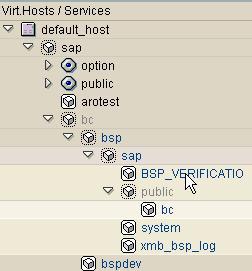
Explanation
In this example, the services sap/bc and sap/bc/bsp/sap/public have been deactivated. As a result, the services that were explicitly deactivated (gray) and all of their subservices (blue) are unavailable.
If you now reactivate the sap/bc service, you can select whether you want to activate the service itself, or all inactive subservices as well. In the first case, sap/bc/bsp/sap/public would still be inactive (and as a result, sap/bc/bsp/sap/public/bc would also be unavailable); in the second case, all services would be available again.