Multiple Currency Translation Types in One
Query
Multiple Currency Translation Types in One
Query

In the following a query with two structures will be considered. The structure element of the column is the key figure Net Sales. The structure elements of the lines are comprised of specifications from the Country characteristic. If currency translation types are defined for both structures, there can be overlays form two different translation types in one cell. Then it depends on the order in which you defined the translation conversion types. The translation type that you last set always takes precedence, even within a structure.
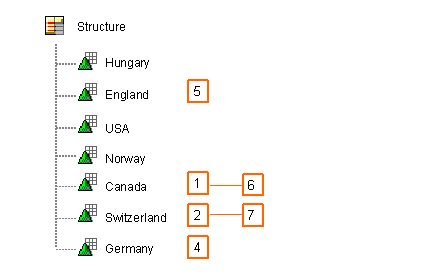
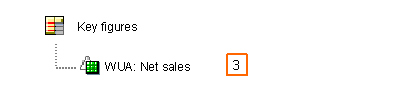
Prioritization will be clarified using the following examples. The numbers show in which sequence the individual elements were defined in the Query Designer of a currency translation type. The following examples refer to this sequence. If the structure element in the Net Sales column has a translation type, it always has USD as the target currency. The structure elements from the lines are always translated into the respective country currency (England à GBP, Canada à CAD, Switzerland à CHF, Germany à EUR) as long as they have a translation type.
Structure elements of the lines:
Structure element of the column:
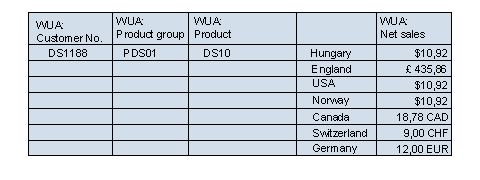
Example 1:
None of the elements have a defined currency translation type, that is, all currencies will be displayed in the currency DB:

Example 2:
A currency translation type with a target currency of USD is defined for the ‚net sales’ key figure:

Example 3:
Only one currency translation is defined in the structure element of the line. The translation should be performed into each country’s currency.
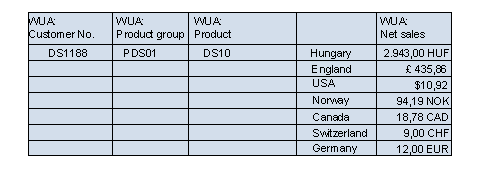
Example 4:
First a currency translation type is defined for the structure element of the line for Canada. The translation is made into CAD. Then a currency translation type is defined for the structure element of the line for Switzerland – the translation should be made into CHF. Then a currency translation type is defined for the key figure ‘net sales’, which stipulates that the translation should be into USD (see mapping of the structures above: 1, 2, 3):
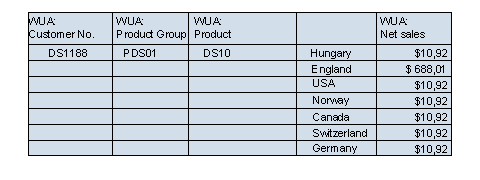
Example 5:
The example is structured exactly as in 4), with the only difference being that a translation type for Germany and England is defined afterwards for the structure elements of the line. Both are translated into the country’s currency (see mapping of the structures above: 1, 2, 3, 4, 5):
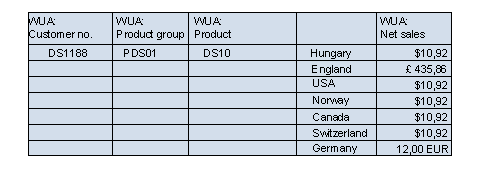
Example 6:
The example is structured exactly as in 5), with the only difference being that a translation type for Canada and Switzerland is defined afterwards for the structure elements of the line. Both are translated into the country currency (see mapping of structures above: 1, 2, 3, 4, 5, 6, 7):