
 Rule Type

Use
The rule type determines whether and how a characteristic or key figure, or a data field or key field is updated into the target.
Features
The following options are available:
Direct Assignment:
The field is filled directly from the selected source InfoObject. If the system does not propose a source InfoObject, you can assign a source InfoObject of the same type (amount, number, integer, quantity, float, time) or you can create a routine.
If you assign a source InfoObject to a target InfoObject that has the same type but a different currency, you have to translate the source currency into the target currency using a currency translation, or apply the source currency.
If you assign a source InfoObject to a target InfoObject that has the same type but a different unit of measure, you have to convert the source unit of measure into the target unit of measure using a unit of measure conversion, or apply the unit of measure from the source.
Constant:
The field is not filled by the InfoObject; it is filled directly with the value specified.
Formula:
The InfoObject is updated with a value determined using a formula.
For more information, see Transformation Library and Formula Builder
Read Master Data:
The InfoObject is updated by reading the master data table of a characteristic that is included in the source with a key and a value and that contains the corresponding InfoObject as an attribute. The attributes and their values are read using the key and are then returned.

The Financial Management Area characteristic is included in the target but does not exist in the source as a characteristic. However, the source contains a characteristic (cost center, for example) that has the Financial Management Area characteristic as an attribute. You can read the Financial Management Area attribute from the master data table and use it to fill the Financial Management Area characteristic in the target.

It is not possible to read recursively, that is, to read additional attributes for the attribute. To do this, you have to use routines.
If you have changed master data, you have to execute the change run. By reading the master data, the active version is read. If this is not available, an error occurs.
If the attribute is time dependent, you also have to define when it should be read: at the current date (sy-date), at the beginning or end of a period (defined by a time characteristic in the InfoSource), or at a constant date that you enter directly. Sy-date is used as the default.
Routine:
The field is filled by the transformation routine you have written.
For DataStore objects and InfoObjects: you cannot use the return code in the routine for data fields that are updated by being overwritten. If you do not want to update specific records, you can delete these from the start routine.
If, for the same characteristic, you generate different rules for different key figures or data fields, a separate data record can be created for each key figure from a data record of the source.
With InfoCubes: You can also select Routine with Unit. The return parameter 'UNIT' is then also added to the routine. You can store the required unit of the key figure, such as 'ST', in this parameter. You can use this option, for example, to convert the unit KG in the source, into tons in the target.
If you fill the target key figure from a transformation routine, currency translation has to be performed using the transformation routine. This means that automatic calculation is not possible.
Time Update:
When performing a time update, automatic time conversion and time distribution are available.
Direct Update: the system automatically performs a time conversion.
Time Conversion:
You can update source time characteristics to target time characteristics using automatic time conversion. This function is not available for DataStore objects, since time characteristics are treated as normal data fields. The system only displays the time characteristics for which an automatic time conversion routine exists.
Time Distribution:
You can update time characteristics with time distribution. All the key figures that can be added are split into correspondingly smaller units of time. If the source contains a time characteristic (such as 0CALMONTH) that is not as precise as a time characteristic of the target (such as 0CALWEEK), you can combine these characteristics with one another in the rule. The system then performs time distribution in the transformation.
For example, you break down the calendar month 07.2001 into the weeks 26.2001, 27.2001, 28.2001, 29.2001, 30.2001 and 31.2001. Each key figure that can be added receives 1/31 of the original value for week 26.2001, 7/31 for each of weeks 27, 28, 29, and 30, and exactly 2/31 of it for week 31.
The example is clearer if you compare it with the following calendar:
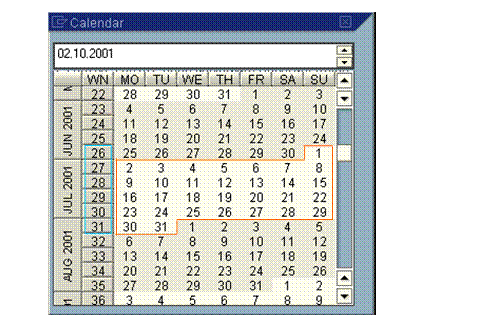
The time distribution is always applied to all key figures.
Initial:
The field is not filled. It remains empty.
No Transformation:
The key figures are not written to the InfoProvider.
Unit of Measure Conversion and Currency Translation
You can convert data records into the unit of measure or currency in the target transformation.
For more information, see:
● Currency Translation During Transformation
● Quantity Conversion During the Transformation