Elimination of Internal Business
Volume
Elimination of Internal Business
Volume

Use
You can use this function to eliminate the internal business volume when executing a BEx query. In other words, the effect of this function is that revenues made between two cost centers in an organization are no longer displayed.
Prerequisites
You have an InfoProvider that includes two characteristics (sender and receiver) that contain the same reference (and, thus, contain the same master data) and are on the same level within the hierarchy.

Note that you can only create aggregates for InfoCubes which contain both characteristics (sender and recipient).
Features
To eliminate internal business volume in an InfoProvider, you have to create a key figure with a reference. You then include these in the InfoProvider. The value is kept here after the elimination during the query, but is not included in the fact table for the InfoCube (or in the DataStore object).
Creating the reference key figure
When creating a key figure, select Key Figure with Reference. In the InfoObject maintenance you have an additional tab page, Elimination. Enter one or more characteristic pairs here regarding the key figure to be eliminated. In doing so, always choose a “sending characteristic” and a “receiving characteristic”. A typical example for such a pair of characteristics is Sending Cost Center and Receiving Cost Center. The characteristics of such a pair must have the same reference characteristic. You can also enter the names of the navigation attributes here.
You can display permitted characteristics for an elimination characteristic by using the input help.
If have specified several characteristic pairs, you still have to specify one of the following by using the selection buttons:
· all characteristic pairs need to be eliminated - then the key figure value is only eliminated if the elimination condition is fulfilled for all characteristic pairs (AND relationship)
· each individual characteristic pair needs to be eliminated - then the key figure value is already eliminated as soon as the elimination condition for one of the characteristic pairs is fulfilled (OR relationship)
Example
The profit center Production Accessories (UK) has $50.00 of internal revenue from profit center Internal Service (DE). This amount needs to be eliminated.
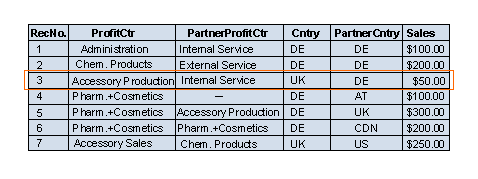
In the following example, different options are shown for different cases, including using these example hierarchies to display a profit center hierarchy and a country hierarchy.
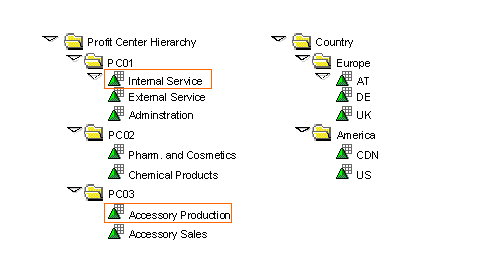
Query example 1:
You create a referenced key figure, Profit Center Sales. For your characteristic pair, you choose Profit Center (0PROFIT_CTR) and Partner Profit Center (0PART_PRCTR). In the query you use the profit center hierarchy. The (internal business volume) amount of $50, which Production Accessories received internally, is eliminated for this profit center for the next highest level.
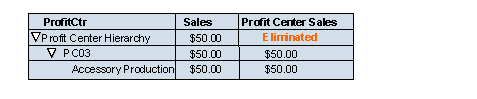
Query example 2:
You create a referenced key figure, Country Sales. As your characteristic pair, you choose Country (0COUNTRY) and Partner Country (0PCOUNTRY). In the query, you use the country hierarchy. The (internal business volume) amount for Europe and the country is eliminated, because the amount of $50 was counted from Germany to the UK.
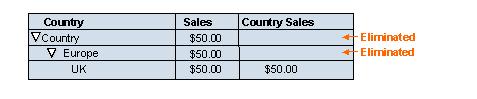
Query example 3 (elimination with regard to all characteristic pairs):
You create a referenced key figure, Sales After Elimination, that includes the characteristic pairs
· Country (0COUNTRY) and Partner Country (0PCOUNTRY)
· Profit Center(0PROFIT_CTR) and Partner Profit Center(0PART_PRCTR)
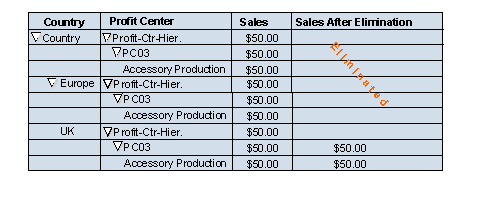
. Choose the option Elimination with Regard to All Characteristic Pairs. In the query, use the hierarchies displayed above for country and profit center. The sales are then eliminated for the nodes for which both elimination conditions are fulfilled. In this example, the sales are eliminated on the node level, Europe. This is because the profit center, as well as both countries DE and UK, are appended underneath, between which the sales are eliminated.
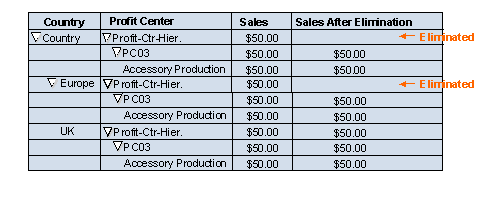
Query example 4 (elimination with regard to each individual characteristic pair):
You create a referenced key figure, Sales After Elimination, that includes the characteristic pairs
· Country (0COUNTRY) and Partner Country (0PCOUNTRY)
· Profit Center(0PROFIT_CTR) and Partner Profit Center(0PART_PRCTR)
. Choose the option Elimination with Regard to Each Individual Characteristic Pair. In the query, use the hierarchies displayed above for country and profit center. Then all sales are eliminated that were sent either between Country and Partner Country or between Profit Center and Partner Profit Center. In this example, the sales are already eliminated from the node level, because the condition already applies for the profit center. The country was not considered for this node.