 Defining Totals Lists


Defining Totals Lists
Use
You can use totals lists to generate lists that only display control- and overall totals.

You can display control- and overall totals in a secondary list by using the Display totals only function in the list display.
For technical reasons, totals lists can only be used in ABAP lists.
Prerequisites
Procedure
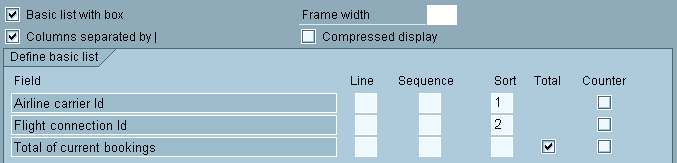
Use query G7 to generate a list, which contains the revenues, i.e. the total bookings, for each airline carrier and flight connection in this example.
In the Basic List Line Structure screen, determine the sort sequence and the fields to be summed:
 function to go to the Control Levels screen.
The column Total must be selected for this control level on the screen.
This definition generates the following list:
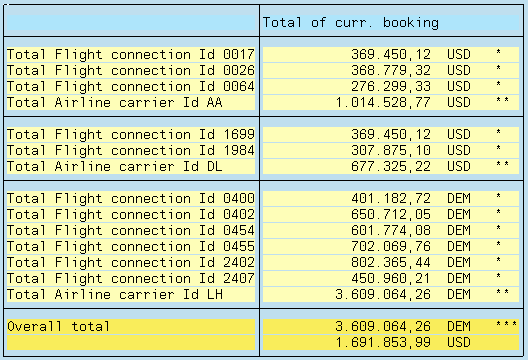
Totals lists also generate an automatic currency distribution, if the summed field is a currency amount field. In contrast to single item output, however, the currency always appears after the totals. The same applies to quantity fields.
Just as in the example above, you can define a list where only the results of counter operations are displayed. You can also combine both types of lists.