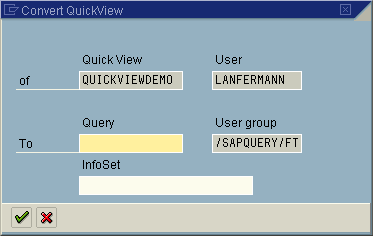
Converting QuickViews to Queries


Converting QuickViews to Queries
Use
You can convert any QuickView into a query. More functions and report forms are available in SAP Query than in the QuickViewer. In addition, SAP Query allows you to re-use transfer queries to other systems and clients.
Prerequisites
In order to convert a QuickView into a query, first choose a user group that you are assigned to and that you will subsequently want to assign your query to. If the QuickView you want to convert is based on an InfoSet, then this InfoSet must be assigned to your user group.
Procedure
To convert a QuickView to a query, proceed as follows: