
 BI Java Connectors

Purpose
BI JDBC Connector is a JCA-enabled (J2EE Connector Architecture) resource adapter. It implements the APIs for the BI Java SDK and allows you to connect various data sources to the applications you have created using the SDK. You can also use BI Java JDBC Connector to make these data sources available in SAP BI systems (by means of UD Connect), or to create systems in the portal to use in Visual Composer scenarios.
The following diagram outlines potential usage scenarios for BI Java Connectors:
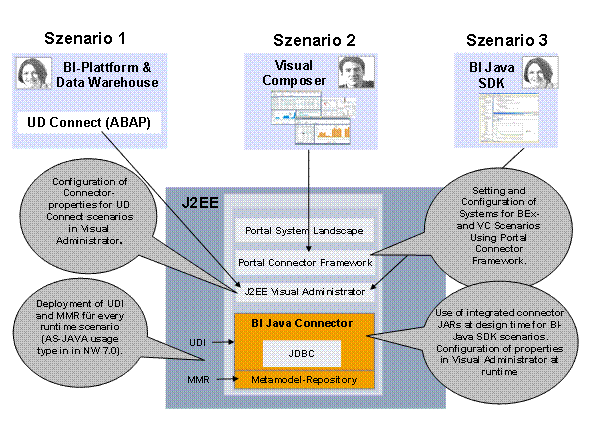
As illustrated, you can use BI Java JDBC Connector to create systems for use in four different scenarios. Since BI Java JDBC Connector is part of SAP Universal Data Integration (UDI), these are often referred to as UDI scenarios:
● Scenario 1: UD Connect
On the BI platform, you can use UD Connect to make data from systems based on the BI Java Connectors available in SAP BI. More information: Transferring Data with UD Connect.
You can find more information about configuring BI Java Connector for this scenario in the SAP Implementation Guide, under SAP NetWeaver → Business Intelligence → UDI Settings by Purpose → UD Connect Settings. You can find more information about the configuring connector properties under Configuring BI Java Connector.
● Scenario 2: Visual Composer
You can use data from systems based on BI Java Connector in Visual Composer, the portal-based visual modeling application. More information: Visual Composer Modeler’s Guide.
To configure
BI Java Connector for this scenario, see the
 Visual Composer
Installation and Configuration Guide, and see
Running the System
Landscape Wizard and
Editing Systems to
configure the systems on the portal.
Visual Composer
Installation and Configuration Guide, and see
Running the System
Landscape Wizard and
Editing Systems to
configure the systems on the portal.
You can build custom Java applications based on data in systems created with BI Java Connector. More information: BI Java SDK.
You can find more information about configuring the BI Java Connectors for this scenario under Configuring BI Java Connector.
Features
To connect to relational JDBC data sources, you can use BI JDBC Connector,
Connector Overview
Connector |
Access To |
Technology Based On |
System Requirements |
BI JDBC Connector |
Relational data sources: over 170 JDBC drivers Examples: Teradata, Oracle, Microsoft SQL Server, Microsoft Access, DB2, Microsoft Excel, text files such as CSV |
Sun's JDBC (Java Database Connectivity) -- the standard Java API for Relational Database Management Systems (RDBMS) |
JDBC driver for your data source |
More Information:
● To configure BI Java Connector on the server using the Visual Administrator, see Configuring BI Java Connector
●
To create a system
on the portal using a BI Java Connector, see
Creating
Systems.
● For more information about the J2EE Connector Architecture (JCA), see http://java.sun.com/j2ee/connector/
● For information about the BI Java SDK and its connection architecture, see the index.html file in the SDK distribution package
● More information about SDIK: BI Java SDK