
 Role Distribution Process

Purpose
Role and user assignments that are created and managed in SAP NetWeaver Portal are not linked to any authorizations in the ABAP-based back-end system. A user is only granted authorization to execute services, for example, transactions and BSP applications, in an ABAP system from the portal once the portal roles have been transferred to the corresponding ABAP system and the corresponding authorization role has been correctly assigned. In the portal role, these are iViews containing accesses to services in the back-end system.
You cannot transfer roles from the portal to the ABAP system on a one-to-one basis because the roles have different definitions. Instead, authorization roles (see Maintenance of Authorization Roles) that only contain objects that are relevant for the ABAP system are created in the ABAP system. The authorization roles in the ABAP system are single roles with menu and authorization data.
Process Flow
The roles defined on the portal side must be transferred to the connected ABAP systems. The distribution process has two steps:
...
1. In the portal: Distribute the role definitions and user assignments to the ABAP system that is responsible for role maintenance within the system landscape.
You can call the distribution function in the administrator role with System Administration → Permissions → SAP Authorizations. When you transfer the roles, the entries relevant for authorization maintenance in the ABAP system are filtered out in the portal role. You can transfer transactions and nontransactional services to the ABAP system. All other objects are ignored.

You first distribute the portal roles to the ABAP system and then distribute the role-user assignments.
2. In the ABAP system: Manual follow-up processing of the transferred roles using transaction WP3R.
In the ABAP system, you must create an authorization role per portal role and per logical system. You can create more than one authorization role per portal role and per logical system, depending on how many authorization versions you require.
Afterwards, you assign the authorization roles to the users in the ABAP system.
The process requires manual follow-up processing since, in contrast to roles in the ABAP system, portal roles do not recognize the division into responsible organizational units (such as company codes and plants) and therefore cannot supply the authorization checks connected with the transaction with data.
Example
The following graphic shows how the portal definition of a role is assigned to an authorization role in the ABAP system:
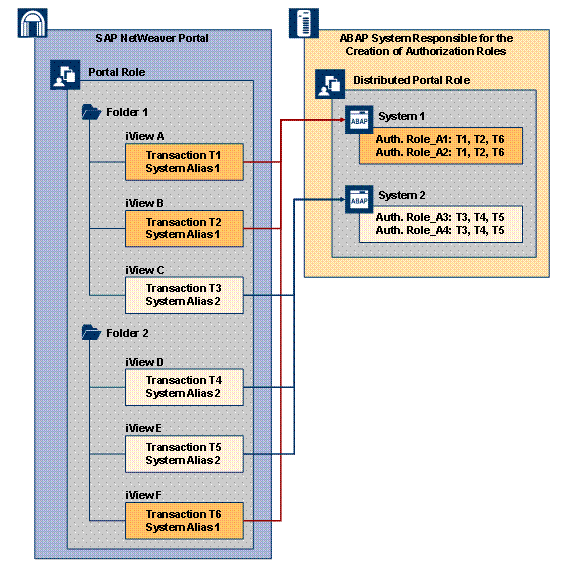
In the portal, a search mechanism in a portal role determines the iViews containing transaction codes for a certain logical system. An alias name is used to determine the logical system in which the transaction codes contained in the iViews should be distributed with the corresponding portal role names. For more information about the search mechanism see Transferring Role Data.
At least one authorization role must be created for each logical system in the ABAP system.