
 Calling Services and Managing Contacts

Use
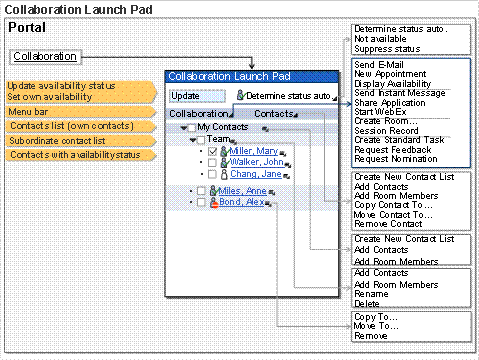
The central point of entry for collaboration in the portal is the Collaboration Launch Pad (CLP). It contains the Collaboration menu with all available functions. In the default setting, you launch the CLP in the masthead by choosing the Collaboration link.
You can execute the following activities in the CLP:
● Managing your contacts (in the contact list)
● Launching services and functions for collaborating with other portal users.
The graphic below illustrates the structure and functions of the CLP.
Integration
As well as in the
CLP, the Collaboration menu is also available in the
 member list of the
rooms. In the standard system, it
provides the same services as in the CLP; however, the administrator can
configure it differently.
member list of the
rooms. In the standard system, it
provides the same services as in the CLP; however, the administrator can
configure it differently.
Features
CLP Function |
Description |
Structuring the contact list |
To structure your contacts list more clearly, you can
create subordinate contacts lists. You can rename or delete the subordinate contacts lists. To do this, choose the required function in the context menu for the relevant subordinate contacts list. |
Managing contacts |
You can add the following types of contacts to your contacts list: ● Portal users ● User groups ● Member of a room (sorted by room roles) Proceed as follows: ●
Adding to the
contacts list My Contacts: ●
Adding to a
subordinate contacts list: You can copy, move, and remove the contacts you have added. To do this, choose the required function in the Contacts menu or the context menu for the relevant contact. |
Using the availability status |
When you use the availability status, the CLP provides the following options: ● Displaying the current availability of your contacts. By choosing the corresponding button, you can update the display of the availability status. ● Setting the display of your own availability status. |
Calling services |
In the CLP
Collaboration menu, you can launch collaboration services for one or
more contacts or use functions that enable collaboration. To collaborate with your contacts, proceed as follows: ● Select the contacts in question. ● In the Collaboration menu, launch the required service. |