
 Enterprise Reporting

Purpose
Enterprise Reporting is the reporting component of Business Explorer (BEx). With Report Designer, it provides a user-friendly design tool that you can use to create formatted reports optimized for presentation and printing. It also provides you with a number of formatting and layout functions.
Reports created in BEx Report Designer can be converted to PDF documents and printed using the Adobe server. It also provides you with information broadcasting functions and broadcast reports.
Implementation Considerations
Enterprise Reporting for Business Explorer enables the preparation of business data in report form. You can create and print corporate balance sheets, HR master data sheets, and so on, in the format and layout required by the customer. More information: From the Query to the Report.
Integration
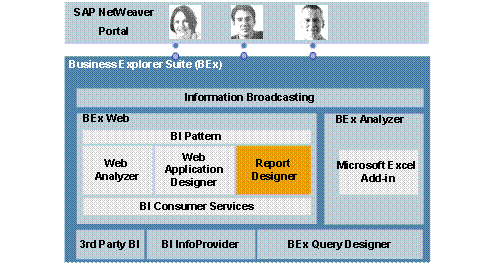
As the reporting component of Business Explorer, Enterprise Reporting fits seamlessly into the BI suite’s function and tool landscape.
BEx Report Designer and the Web Item report allow simple integration of enterprise report design and web application design and thus into the BEx web as well.
The following figure shows this integration:
Features
Enterprise Reporting offers the following functions and tools:
● BEx Report Designer as a central tool for creating reports.
More information: Report Designer
● Web Item Report, which is used to integrate reports into Web applications.
More information: Web Item Report
● PDF Generation as a print-optimized view of reports.
● The technical basis for reports is the row pattern concept. More information: Row Patternsapurl_link_0002_0004_0007
Constraints
Reports created with BEx Report Designer are optimized for presentation and printing, and therefore only have limited navigation options for data analysis (setting filter values, for example). You can find out more about constraints when using Enterprise Reporting in SAP Note 125029. You can use BEx Analyzer, the Web Applications and Web Analyzer for Business Explorer to perform free multidimensional data analysis.
More information: