 Content Mirroring
Content mirroring allows mass duplication of content in the Portal Catalog, while maintaining a direct delta link relationship between the original and copied objects.
Content mirroring in the portal is possible using the content mirroring tool. For instructions on using it, see Using the Content Mirroring Tool.
The primary use of this tool is to copy entire business packages supplied by SAP after they have been imported into the portal. Since business packages supplied by SAP are defined in the reserved namespace of SAP, they cannot be modified. Customers can use this tool to duplicate any business package into their own namespace and then modify it as needed. The delta links between the objects in the original business package and those in the copied one ensure that when the original business package is updated by SAP and imported into the portal over the existing one, the changes made to the duplicated business package by the customer are not lost.
Customers can also use the tool to transport their own portal content objects from one portal area to another (within the same portal). Original objects can be kept untouched in one central system, while all "mirrored" objects are connected to them through delta links. This way, updates can be made freely to the duplicated objects.
Integration
In the tool, you select the source folder to copy, the target folder, a new target namespace (optional), and the object types to copy. All subfolders in the source folder and their content are included. The complete structure of the source folder is recreated in the target folder and is populated with the copied objects. The new objects in the target folder are directly related through delta links to the original objects in the source folder.
For more information on object instance types and how they relate to one another, see Content Object Model.
Features
The result of using the content mirroring tool on folders in the Portal Catalog is the same as that which is achieved when using the Copy/Paste as Delta Link action on individual objects (the action is available in the Portal Catalog's right-click context menu). For more information, see Copying an Object or Folder (Copy / Paste).
 Note
Note
This tool does not mimic the Copy/Paste action available for folders in the Portal Catalog's right-click context menu.
The content mirroring tool currently supports the following object types:
Folders
iViews
Pages
Roles
Worksets
Systems
Activities
The following table compares the Content Mirroring tool with the Copy/Paste action performed on a Portal Catalog folder, rather than on an individual object:
Content Mirroring |
Copy/Paste (of a folder) |
|---|---|
Correlating source objects and the copied objects are directly related to each other through delta links (see following figure). |
Correlating source objects and the copied objects are not directly related to one another through delta links (see figure below). The result is similar to when you copy and paste individual objects using the "Copy" and "Paste as Delta Link" actions. |
The tool is launched from the top-level navigation and detailed navigation areas. It is not integrated in the right-click context menu in the Portal Catalog. |
The action is integrated in the right-click context menu in the Portal Catalog. |
In the Portal Catalog, you cannot selectively choose individual objects to copy. You must choose the parent folder of the relevant objects you want to copy. |
Allows you to select either objects or folders to copy in the Portal Catalog |
Copies only folders, iViews, pages, roles, worksets, and systems. |
Copies all objects types. |
Allows you to choose which object types to copy. |
Does not allow you to choose which object types to copy. |
Allows you to specify if only templates or all objects must be copied. |
Does not allow you to specify if only templates or all objects must be copied. |
Allows you to specify a new namespace for copied objects. |
Does not allow you to specify a new namespace for copied objects. |
The following figure illustrates the main difference between using the regular Copy/Paste action (on a Portal Catalog folder) and the Content Mirroring tool, which is the resulting delta link relationship between the original object and the copied object (a detailed description follows):
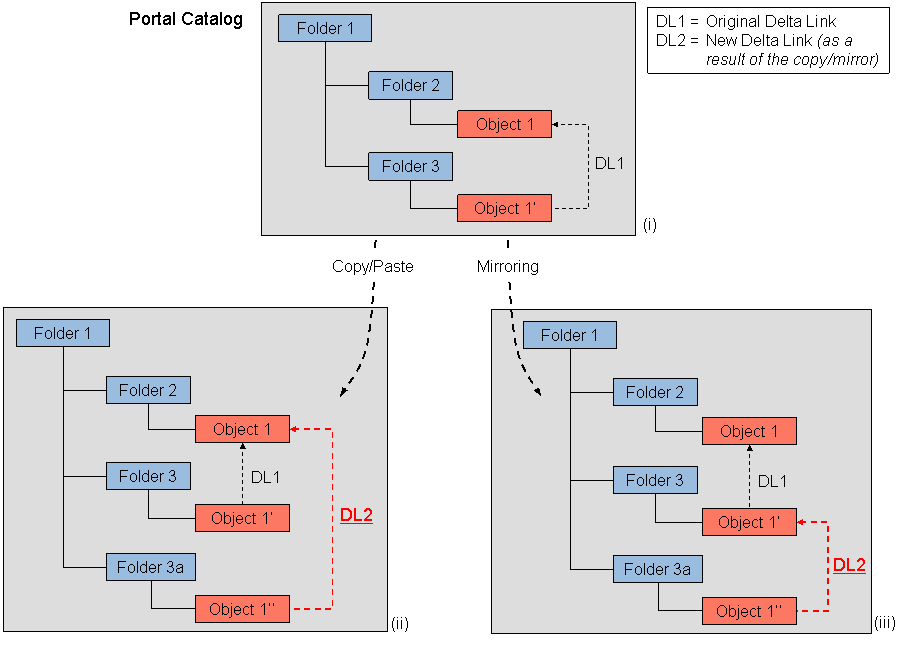
In the previous figure, the top area (i) displays a snapshot of the Portal Catalog at a given time (of figure). Folder 1 is the root folder. Object 1 is located in Folder 2. Object 1' is a delta link (DL1) to Object 1, and is located in Folder 3. Folder 3 is then copied to Folder 1 using both the Copy/Paste action and by means of the Content Mirroring tool.
Copy/Paste scenario (ii): Using the Copy action (by right-clicking the folder and choosing Copy in the context menu), Folder 3 is copied, and then pasted into Folder 1 using the Paste action (by right-clicking the folder and choosing Paste in the context menu). The result is Folder 3a with Object 1'' in it. Object 1'' is a delta link (DL2) to Object 1.
Content mirroring scenario (iii): Using the Content Mirroring tool, Folder 3 is selected as the source folder and mirrored to Folder 1 (similar to the copy/paste scenario above). The result is Folder 3a with Object 1'' in it. However, in contrast to the previous scenario, Object 1'' is a delta link (DL2) to Object 1', not to Object 1.