
 Simple Example: Displaying a Simple Text and
Parameter
Simple Example: Displaying a Simple Text and
Parameter

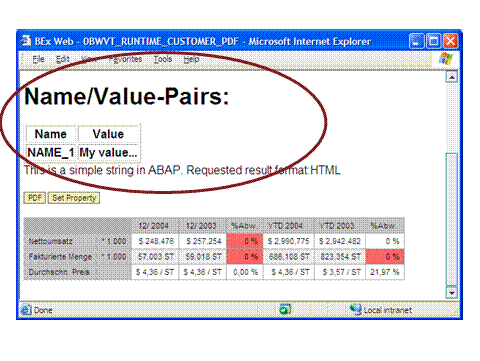
This example relates to displaying a table with a parameter and a simple text. The parameter is passed to the Custom Extension Web item
ABAP Class
The ZCL_BICS_CONS_WEBITEM_ABAP class implements the IF_BICS_CONS_WEBITEM_CUST_EXIT interface.
The properties are read in the IF_BICS_CONS_WEBITEM_CUST_EXIT~INITIALIZE ABAP method and stored as a string in the p_properties ABAP attribute as an HTML table.
A hard-coded string is concatenated with the HTML table of the properties and returned in the IF_BICS_CONS_WEBITEM_CUST_EXIT~EXECUTE ABAP method.
The Java-based BEx Web runtime inserts the returned HTML content into the Web template.
ABAP Methods
METHOD IF_BICS_CONS_WEBITEM_CUST_EXIT~INITIALIZE.
DATA: l_s_name_value TYPE rsbolap_s_name_value.
* The table I_T_PROPERTIES provides the name/value parameters defined
* in the template
* assemble a heading
* ======================================================================
CLEAR p_properties.
p_properties = '<h1>Name/Value-Pairs:</h1>'. "#EC NOTEXT
* open table tag
* ======================================================================
concatenate p_properties '<table border="1">' into p_properties. "#EC NOTEXT
* assemble header line
* ======================================================================
CONCATENATE p_properties '<tr>' INTO p_properties."#EC NOTEXT
CONCATENATE p_properties '<th> Name </th>' INTO p_properties. "#EC NOTEXT
CONCATENATE p_properties '<th> Value </th>' INTO p_properties. "#EC NOTEXT
CONCATENATE p_properties '</tr>' INTO p_properties. "#EC NOTEXT
* assemble name/value lines
* ======================================================================
LOOP AT i_t_properties INTO l_s_name_value.
CONCATENATE p_properties '<tr>' INTO p_properties."#EC NOTEXT
CONCATENATE p_properties '<th>' l_s_name_value-name '</th>' INTO p_properties."#EC NOTEXT
CONCATENATE p_properties '<th>' l_s_name_value-value '</th>' INTO p_properties."#EC NOTEXT
CONCATENATE p_properties '</tr>' INTO p_properties."#EC NOTEXT
ENDLOOP.
* close table tag
* ======================================================================
CONCATENATE p_properties '</table>' INTO p_properties."#EC NOTEXT
ENDMETHOD.
method IF_BICS_CONS_WEBITEM_CUST_EXIT~FREE.
* free all allocated resources here
endmethod.
METHOD IF_BICS_CONS_WEBITEM_CUST_EXIT~EXECUTE.
DATA:
l_string TYPE string.
CLEAR e_xml.
CONCATENATE p_properties 'This is a simple string in ABAP. Requested result format:' I_REQUESTED_RESULT_FORMAT INTO l_string.
TRY.
* The customer exit returns HTML data to be displayed.
* The result HTML needs to be stored in E_XML using UTF-8 encoding.
* You can convert simple ABAP-strings to UTF-8 by calling the
* following the method:
* ==================================================================
CALL METHOD cl_bics_cons_webitem_util=>string_2_utf8_xstring
EXPORTING
i_string = l_string
RECEIVING
r_utf8_xstring = e_xml.
CATCH cx_bics_cons_webitem_error.
* exception handling
ENDTRY.
ENDMETHOD.
ABAP Attributes
Attribute |
Properties |
P_PROPERTIES |
● Type: Instance attribute ● Visibility: Public ● Reference type: STRING ● Description: Character string for properties |
Web Template
The Web template contains the Custom Extension Web item. The name of the ABAP class ZCL_BICS_CONS_WEBITEM_ABAP was specified in the ABAP_CLASS_NAME Web item parameter.
In addition, the SET_ITEM_PARAMETERS command is defined for the SET_PROPERTY pushbutton in order to set a name/value parameter for the Custom Extension Web item.
<bi:bisp xmlns="http://www.w3.org/TR/REC-html40" xmlns:bi="http://xml.sap.com/2005/01/bi/wad/bisp" xmlns:jsp="http://java.sun.com/JSP/Page" >
<html>
<head>
<title >Custom Web Item ABAP Sample</title>
<meta http-equiv="Content-Language" content="en" />
<meta http-equiv="Content-Type" content="text/html; charset=utf-8" />
</head>
<body style="FONT-FAMILY: Arial" bgcolor="#ffffff" leftmargin="0" topmargin="0" >
<bi:QUERY_VIEW_DATA_PROVIDER name="DP_1" >
<bi:INITIAL_STATE type="CHOICE" value="QUERY" >
<bi:QUERY value="0D_DX_M01_Q0002" text="DalSegno Company Umsatz-Analyse" />
</bi:INITIAL_STATE>
</bi:QUERY_VIEW_DATA_PROVIDER>
<bi:TEMPLATE_PARAMETERS name="TEMPLATE_PARAMETERS" />
<bi:CUSTOMER_EXIT_ITEM name="CUSTOMER_EXIT_ITEM_1" designheight="120" designwidth="300" >
<bi:CUSTOMER_EXIT type="COMPOSITE" >
<bi:CUSTOMER_EXIT_TYPE type="CHOICE" value="ABAP_CLASS_NAME" >
<bi:ABAP_CLASS_NAME value="ZCL_BICS_CONS_WEBITEM_ABAP" />
</bi:CUSTOMER_EXIT_TYPE>
</bi:CUSTOMER_EXIT>
<bi:DATA_PROVIDER_ACCESS_LIST type="ORDEREDLIST" >
<bi:DATA_PROVIDER_ACCESS type="COMPOSITE" index="1" >
<bi:DATA_PROVIDER_REF value="DP_1" />
<bi:NAVIGATIONAL_STATE_ACCESS value="X" />
<bi:RESULT_SET_ACCESS value="X" />
</bi:DATA_PROVIDER_ACCESS>
</bi:DATA_PROVIDER_ACCESS_LIST>
</bi:CUSTOMER_EXIT_ITEM>
<p >
<bi:BUTTON_GROUP_ITEM name="BUTTON_GROUP_ITEM_1" designheight="70" designwidth="300" >
<bi:BUTTON_LIST type="ORDEREDLIST" >
<bi:BUTTON type="COMPOSITE" index="1" >
<bi:CAPTION value="Set Property" />
<bi:ACTION type="CHOICE" value="INSTRUCTION" >
<bi:INSTRUCTION >
<bi:SET_ITEM_PARAMETERS >
<bi:cmd_item_parameters type="CUSTOMER_EXIT_ITEM" >
<bi:CUSTOMER_EXIT type="COMPOSITE" >
<bi:NAMED_PROPERTY_LIST type="UNORDEREDLIST" >
<bi:NAMED_PROPERTY type="COMPOSITE" index="1" >
<bi:NAME value="NAME_1" />
<bi:VALUE value="My value..." />
</bi:NAMED_PROPERTY>
</bi:NAMED_PROPERTY_LIST>
</bi:CUSTOMER_EXIT>
</bi:cmd_item_parameters>
<bi:TARGET_ITEM_REF value="CUSTOMER_EXIT_ITEM_1" />
</bi:SET_ITEM_PARAMETERS>
</bi:INSTRUCTION>
</bi:ACTION>
</bi:BUTTON>
</bi:BUTTON_LIST>
</bi:BUTTON_GROUP_ITEM>
</p>
<p >
<bi:ANALYSIS_ITEM name="ANALYSIS_ITEM_1" designwidth="400" designheight="200" >
<bi:DATA_PROVIDER_REF value="DP_1" />
</bi:ANALYSIS_ITEM>
</p>
</body>
</html>
</bi:bisp>