 Control Properties - Entry List Tab
This tab is used to create or select static or dynamic lists of options, for use in bulleted and numbered lists, drop-down lists, and groups of radio buttons.
The list controls can have one of two types of entry lists:
Static lists have set values that you define.
Dynamic lists are populated at runtime according to the input fields selected and the corresponding values assigned.
You can use this list in conjunction with the Entry List Manager, for selecting global lists that have been defined for use throughout the model. For more information, see How to . . . Create an Entry List in the SAP NetWeaver Visual Composer Modeler's Guide.
Structure
When the Entry List tab is first displayed, the List scope set of radio buttons provides these options:
Static
Dynamic
Global
The display of the properties in the tab changes according to these selections.
Static Entry List
Control |
Description |
|---|---|
Value column header |
The value of the option displayed in the list |
Display Text column header |
The text to display for the option |
|
Add a new entry |
|
Delete the selected entry |
|
Move the selected entry one place up in the list |
|
Move the selected entry one place down in the list |
 (Add)
(Add) (Delete)
 (Move Up)
 (Move Down)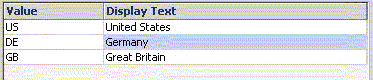
Example
Dynamic Entry List
When you choose the Dynamic radio button from the List scope group, the Find Data Service dialog box is displayed. Search for your data service and define your input and output ports, as explained in the Find Data Service Dialog Box section, which follows.
Section/Field |
Control |
Description |
|---|---|---|
Data service |
|
Used to display the Find Data Service Dialog Box, for selecting the data service and its input and output ports, for the entry list. |
Input port |
Input Field column header |
Displays the fields channeled through the input port that you selected in the Find Data Service dialog box. |
Assigned Value column header |
The values that you require in order to get the output values that you want in your list, defined by:
|
|
Output port |
Output Field column header |
Displays the VALUE and the TEXT rows to define the two fields that correspond to the actual value returned and the text to be displayed in the list (see example following) |
Assigned Value column header |
The VALUE is the field from which the value should be taken and the TEXT is the field from which the actual displayed text should be taken (see example following). |
|
Sort checkbox |
Lists the options alphabetically in the list. |
|
Allow duplicates checkbox |
Enters identical text options more than once, according to the results returned. |
|
Additional entries checkbox |
Expands the dialog box to allow you to add static text options to the list. |
|
Additional entries |
Value column header |
Adds static entries to the list, defined by clicking |
Display Text column header |
 (Data Service )
 (Expand)
 (Contract)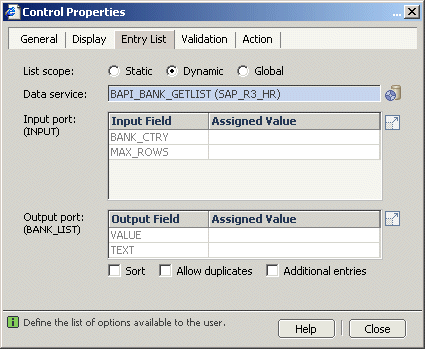
Example
Global Entry List
This option displays a pane listing all static and dynamic entry lists that have been defined in the Entry List Manager as "global", for use throughout the model. To edit a displayed global entry list, select it and click  (Global Entry List)at the right.