Example: Dragging a Characteristic to a Data
Cell Using Drag and Drop
Example: Dragging a Characteristic to a Data
Cell Using Drag and Drop

Use
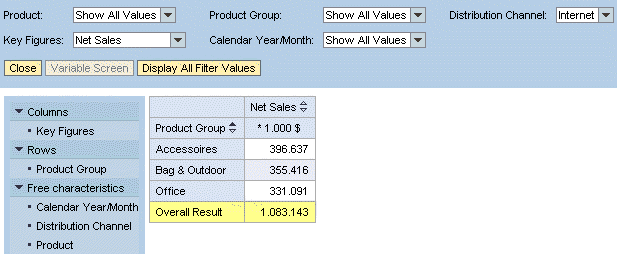
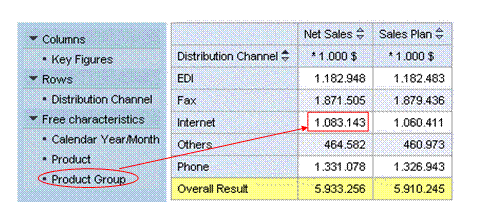
You are interested in a specific figure in the analysis grid and want to get more detailed information. You want to know how the net sales achieved by Internet can be broken down according to each of the product groups.
Procedure
Drag the Product Group characteristic to the data cell for the distribution channel Internet and the key figure Net Sales.
Result
The analysis grid is updated accordingly: The detail view for the selected data cell is displayed and outlines how each of the product groups contributes to the net sales for the distribution channel Internet. As a result of the drag and drop action, the system filters the characteristic Distribution Channel automatically to the characteristic value Internet. This information is displayed in the filter pane.