Example: Dragging a Characteristic to the
Columns Using Drag and Drop
Example: Dragging a Characteristic to the
Columns Using Drag and Drop

Use
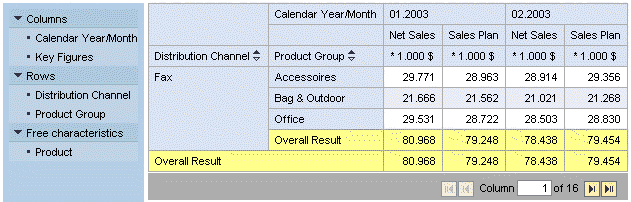
You want to move a characteristic from the rows to the columns; you want to place the characteristic above the key figure structure in the columns.
Procedure
You have the following options:
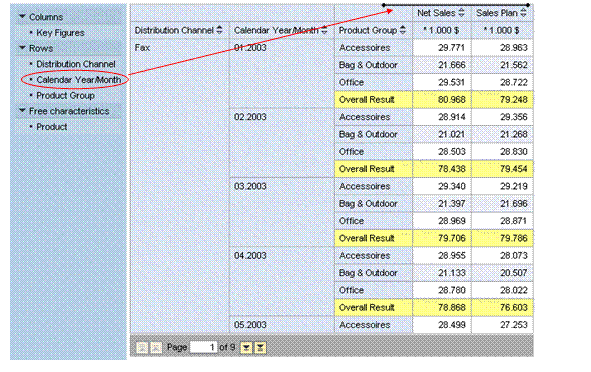
● Using drag and drop, drag the characteristic Calendar Year/Month from the navigation pane to the column header in the analysis grid.
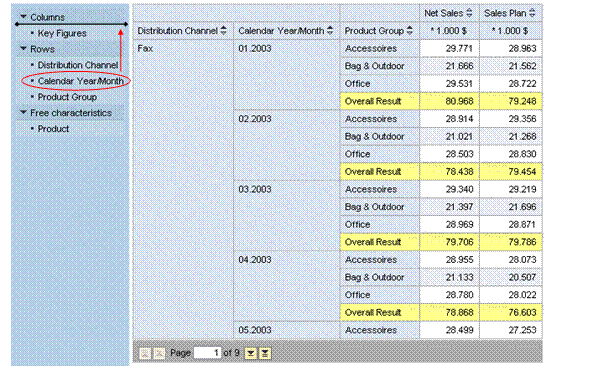
● Using drag and drop, drag the characteristic Calendar Year/Month within the navigation pane to the column header.
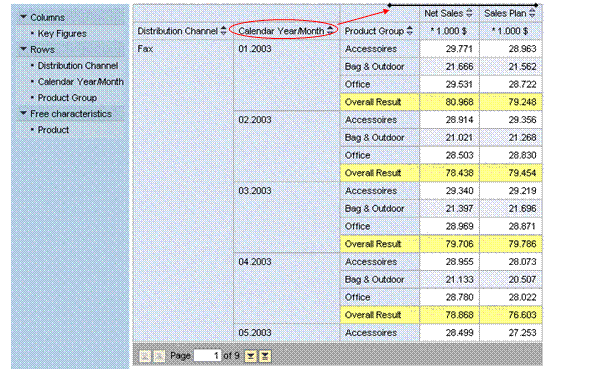
● Drag the characteristic Calendar Year/Month within the analysis grid to the column header.
Result
The analysis grid is updated accordingly: The characteristic Calendar Year/Month is now drilled down in the columns above the key figures and the corresponding data is displayed.