
 Executing a Planning Function

Use
Using the Execute a Planning Function command (EXEC_PLANNING_FUNCTION), you can trigger the execution of a planning function. For each characteristic, you can specify how the selection will be determined.
Command Parameters
The table below lists the command parameters as they appear in the Command Wizard when you insert the command:
Parameter |
Description |
Variables Screen |
You use this parameter to specify whether to display a Variables screen. If you do not select this option, the variable screen is displayed only if no entry has been made for required variables. |
Process Changed Data |
You use this parameter to define whether the planning function will process just the data changed by the user in the current session since the last save or process all data (see Planning Functions, Processing Changed Data). If you choose this option, you can specify which aggregation level to analyze as a filter to define the changed records. |
Data Binding: Selection Bindings |
You use this parameter to specify the data that the planning function is executed on. (See Sources for Characteristic Selection and Variables.) |
Data Binding: Variant |
If the planning function uses variables, you can use this parameter to specify how they are to be filled. Using a variable variant, you therefore specify the parameterization of the planning function. (See Sources for Characteristic Selection and Variables.) |
Data Binding: Variables |
You use this parameter to specify the values for individual variables of the planning function. If a variant is also selected, a value assigned using this parameter is given precedence. (See Sources for Characteristic Selection and Variables.) |
Planning Function (PLANNING_FUNCTION) |
Technical name of the planning function. You use this parameter to specify which planning function will be executed. |
Application Context
This command is particularly useful if you want to change data using a planning function, and the Execute a Planning Function (Simple) command is not sufficient.
The graphic below illustrates a query as an example of this kind of modeling:
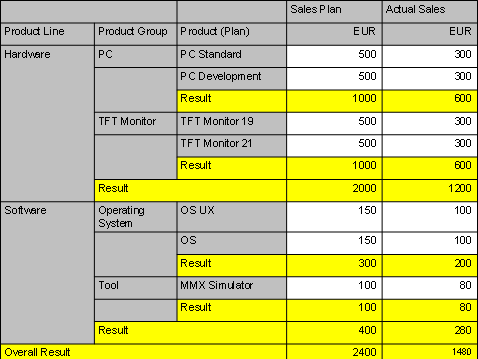
You have a query in the drilldown with characteristic Product and key figures Sales Plan and Actual Sales. These key figures are restricted to the relevant version. Using characteristic Business Year, you filter the results for the year 2006. Using a planning function to revaluate, you want to change the sales plan data.
If you were to use the Execute a Planning Function (Simple) command in this example, you could only specify the query as a whole (or your fixed filter) for the Reference to Data Provider of Type Filter parameter. Since the selection of the restricted key figures is ignored, Version would not be restricted, and the planning function would be applied to both the plan data and the actual data.
However, if you were to use the Execute a Planning Function command in this example, you could specify a data provider for each characteristic. Using a variable Plan for characteristic Version, you can therefore specify that the planning function is only to be applied to the characteristic values specified in variable Plan.