
 Creation of Planning Applications

Purpose
Planning applications are BI applications that are based on a planning model. Power users combine the objects of the planning model into an interactive planning application which allows data to be entered and changed automatically or manually by users.
Planning model objects include:
● InfoProviders that contain data (see InfoProviders)
● Aggregation levels as InfoProviders which provide a set of data with a particular level of granularity for data entry and change (see Aggregation Levels)
● Input-ready queries which allow you to make manual entries for the aggregation level (see Input-Ready Queries)
● Planning functions which allow automated changes to be made to data in the aggregation level and therefore model a part of the data flow (see Planning Functions).
In addition, planning sequences can belong to the planning model (see Planning Sequences).
Tools are available for creating planning scenarios. These tools are also used in reporting scenarios.
● For Excel-based planning applications: BEx Analyzer
● For Web-based planning applications: BEx Web Application Designer
Prerequisites
You have created the necessary planning model objects.
You have installed the frontend.
Example
In order to illustrate the basic procedure, the following example will show you how to create an Excel-based planning application and a Web-based planning application on the basis of a simple planning model.
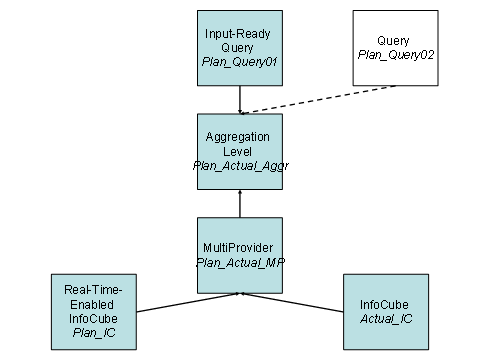
The underlying planning model consists of the following objects:
● A real-time-enabled InfoCube Plan_IC containing the planned sales data for next year
● A standard InfoCube Actual_IC containing the sales data for the previous year
● A MultiProvider Plan_Actual_MP containing the two InfoCubes
● An aggregation level Plan_Actual_Aggr for MultiProvider Plan_Actual_MP
● An input-ready query Plan_Query01 which displays the actual and plan data and allows plan data to be entered manually.
The two InfoCubes contain the same characteristics and have at least one common key figure; the only difference is the key figure Year. One of the characteristics is Country. This has to be included in the query.
The following graphic shows how the objects in the planning model are related:
The planning application contains at least one of the following elements:
● A planning function for copying the data from the InfoCube containing actual data into the InfoCube containing plan data PF_Copy
● A selection list (dropdown box) that allows you to navigate in the query
● A planning function for revaluating plan data PF_Revaluate01 (revaluate by %) or PF_Revaluate02 (with a fixed percentage), where the selections in the selection list determine which data is to be revaluated
● A planning function for saving plan data
●
See also:
Creating Planning Applications in BEx Analyzer
Creating Planning Applications in the BEx Web Application Designer