
 Thread Overview

Use
The active threads used in the cluster node by the portal application as well as the components that are still running and are currently involved are displayed.
The Thread Overview is a „snapshot“ of the data collected for the Request Overview and Component Overview. It is not possible to display a history of the thread for the entire runtime of the request.

To refresh the thread data, click on Display.
A request normally launches a number of components and subcomponents that can also be nested. The components in the request can launch specific actions.

The threads can only be evaluated if all the components and subcomponents of a request run in the same thread.
Example
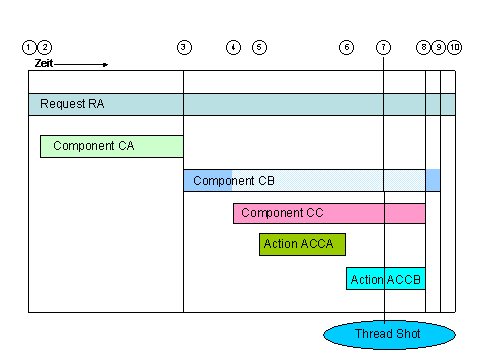
The following graphic shows the data of a thread overview while a request is running:
...
1.
Request
RA starts in the thread.
The thread can be running for a longer time.
2. The first component CA of Request RA starts.
3.
The first
component CA of Request RA ends.
The second component CB of Request RA starts.
4. Component CB starts Component CC (in this case as a subcomponent) and is idle.
5. Component CC creates the first action ACCA.
6. Component CC creates the second action ACCB. Action ACCA ends.
7. Time when the thread overview is called
8. Component CC and Action ACCB end.
9. Component CB ends.
10. Request RA ends.
Features
The following information is displayed:
Column Header |
Purpose |
Processed Components |
Name of the component currently being executed during the snapshot |
Elapsed Time for Component |
Time that elapsed since this component was called |
Processed Action |
Action processed with this component. The component creates the text for the
action. |
Request Name |
(In the example, RA) |
Elapsed Time for Request |
Time elapsed since the request was started (the time for processing in the
backend system is measured). |
Sum of Elapsed Times for Thread |
Time for all requests (sum) that already ran in this thread |
Active |
„Yes“ – thread executes a request at the time of the thread
overview. |
User ID |
ID of the user who started the request |
Thread Name |
Technical name of the thread (thread ID) |
For greater readability, the request and component names are displayed in abbreviated form. The full names are shown in the Quick Info text. If you click on a table cell with the request or component name, the full name is displayed in the lower part of the iView.
For all the data, a value of n/a
means that you cannot define a value.
A value of 0 means that the time
measured was extremely short.
However, the measured value is not displayed because of the error tolerance
for imprecise measurement in the operating system.
Activities
Selecting a Portal Server
In the Select Server dropdown list, select the portal server of the cluster and choose Display.
Filtering the Display
By default, the information of the active thread is listed (Show all items) each time the page is called. You can filter the list individually by:
...
1. Selecting only items where ,
2. Selecting or entering the desired filter criteria,
3. Clicking on Display.
The requests are then displayed in filtered form and sorted as you requested.
The filter criterium Active=All means that the threads are displayed independently of their status (both active and inactive).