Worklists

Definition
A worklist contains all the objects that are marked in the portal as text and that thus can be translated. This includes the resource bundles (text parts of PAR files) and the properties of the portal objects that are declared as text attributes.
Use
A worklist divides texts into sensible units that can be edited and:
· administered by one or more administrators
· converted by translators from a source language to a target language
Status
A worklist can have different statuses, depending on its current location in the translation process. To find out how to see the current status, read Displaying the Status of a Worklist.
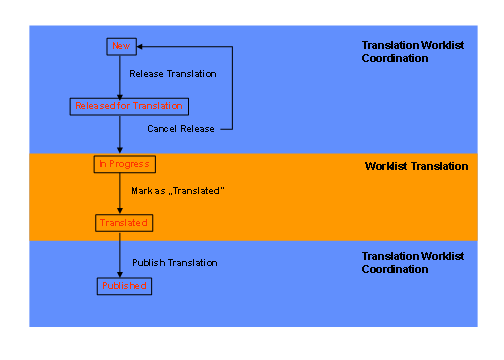
The following graphic shows the different statuses of a worklist. Within translation worklist coordination, a worklist that is newly created has status „new“ The status changes to „released“ when it is released for translation. When the release is canceled („Cancel Release“), the status is reset to „new“. When a worklist is being translated, it has status „in progress“. The translator sets the status to „translated“ when the translation has been completed. Worklists in status „translated“ can be set to „published” within worklist coordination. When the status changes to „published“, the texts are written back to the objects to which they belong. For example, if there is a resource bundle for a PAR file for language DE, it is stored in the same directory as the PAR file.