
 Update Routines and Start Routines

Use
You use routines to define complex update rules for a key figure or characteristic.
Routines are ABAP programs that consist of a predefined global data declaration part and an ABAP form routine. The form routine contains all the ABAP programming functions.
You can use the following types of routines in the update:
· The start routine - this routine is run exactly once for a data package at the beginning of the update program
· Routines for updating key figures with and without a return table
· Routines for updating key figures and their unit
· Routines for updating characteristics
Functions
Routines for characteristics and key figures without a return table
The form routine has the following parameters:
· MONITOR: Available for user-defined monitoring (see also Error Handling in the Update Routine)
· MONITOR_RECNO: The record number is specified for monitoring.
· COMM_STRUCTURE: The routine for the record that you want to update from the communications structure is stored in the COMM_STRUCTURE variable.
· RECORD_NO: Variable RECORD_NO contains, in the form of the communications structure, the number of the transaction data record that is currently to be edited.
· RECORD_ALL: Variable RECORD_ALL contains the number of transaction data records in the form of the communications structure.
· SOURCE_SYSTEM: Variable SOURCE_SYSTEM contains the technical name of the source system.
· RESULT: Variable RESULT must be assigned the result of the computed key figure or computed characteristic.
· RETURNCODE: You use the RETURNCODE variable to control how the data target is written to. The computed RESULT value is only written to the data target if RETURNCODE is equal to 0. If RETURNCODE is not equal to 0, there is an error in the calculation. With key fields, the calculation is terminated, meaning that no data record is determined for this key figure and it is skipped. Data fields are initialized.
· abort: If abort is not equal to 0, the entire update process is canceled.

In the following example, the loading process is canceled if the value for the InfoObject AMOUNT is less than 0. In this case, the message ‘100’ of type ERROR (E) with the message class ‘ZJH’ appears.

ERROR-type messages also appear in the monitor when the status of the IDoc is displayed.
1. |
* if abort is not equal zero, the update process will be canceled |
2. |
if comm_structure-amount < 0. |
3. |
monitor-msgid = ‘ZJH’. |
4. |
monitor-msgty = ‘E’. |
5. |
monitor-msgno = ‘100’. |
6. |
monitor-msgv1 = comm_structure-amount. |
7. |
append monitor. |
8. |
abort = 1. |
9. |
exit. |
10. |
else. |
11. |
abort = 0. |
12. |
endif. |
13. |
* result value of the routine |
14. |
result = comm_structure-amount. |
Routines for Key Figures with Unit Calculation
If you set the Routine with Unit Calculation flag, the additional UNIT return parameter is also available. There you can store the desired unit for the key figure, for example DEM or ST. See also Currency Translation in the Update.
Routines for key figures with return table
For routines with a return table, the RESULT parameter is replaced with the RESULT_TABLE return table. The return table has the same structure as the data target. However, only the key figure or data field, for which the routine was created, is filled, plus its characteristics or key fields. This allows you to distribute aggregated values.
The InfoSource delivers the sales figures for the individual sales organizations. However, the sales need to be displayed for each employee. The following processing steps are required here:
- Read, from the master data table prepared by the InfoSource, the employee IDs that belong to the sales organization.
- Divide the amount of sales by the number of employees that have been read from the master data table.
- Create an entry in your return table for each employee.
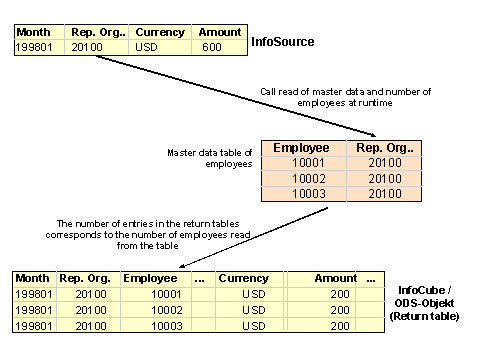
The ICUBE_VALUES parameter is also available. The calculated characteristic values are stored here. The easiest way to fill the RESULT_TABLE return table, is to copy the ICUBE_VALUES structure into the RESULT_TABLE table as often as is necessary, and only fill the corresponding key figure and adjust the characteristic values.
Note the following special case: If you use a key figure routine with return table and additional currency translation, the currencies are NOT stored in ICUBE_VALUES structure, because they are only calculated once the routine has been executed.
Start routine
The start routine is run for each data package at the start of the update. The start routine has only these parameters: MONITOR, MONITOR_RECNO, DATA_PACKAGE, RECORD_ALL, SOURCE_SYSTEM and ABORT. DATA_PACKAGE refers to the entire data package. The start routine does not have a return value. It is used to perform preliminary calculations and store these in a global data structure or in a table. You can access this structure or table from other routines.
In the update, you want to credit a certain percentage of the sales turnover to the individual salespersons of a sales office. For example, salesperson A 20% of the turnover of sales office A, salesperson B 30%, salesperson C 50%. The salespersons and their sales offices are listed in a master data table. The uploaded data contains the sales office and sales figures as characteristics. To be able to assign the salespersons to the sales offices, you have to read the data from the master data table on demand. If the master data table is not comprehensive enough, you can generate an internal table in the start routine that contains the master data and that can access the subsequent key figure and characteristic routines.
You also have the option of changing data (for example, modifying or deleting it) by using ABAP code to change the DATA_PACKAGE table.
See also: