 Maintenance Strategy
When calculating configuration files, the Maintenance Optimizer calculates the consistent target status with the minimum effect on all systems. During a maintenance transaction, you are prompted to confirm the calculated target constellation. You should check maintenance files calculated for the systems, before confirming.
Example 1: Landscape Pattern: Sidecar
The following examples illustrate this strategy:
Initial constellation:
Product System |
Active product version |
Product instances installed in the technical systems |
|---|---|---|
SAP ERP |
SAP ERP 6.0 |
SAP ECC Server, AS ASAP |
[SAP NetWeaver] SAP EP Core, AS Java [SAP ERP] SAP XSS, SAP ERP Business Packages, SAP FSCM - Biller Direct |
A Sidecar technical system is only assigned to one product system.
You want to update the product system SAP ERP from SAP ERP 6.0 to SAP ERP 6.0 EHP5.
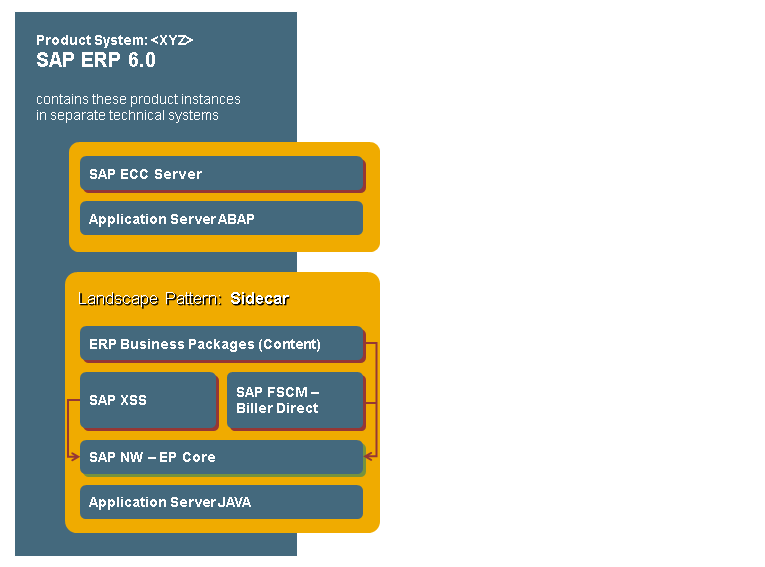
For this maintenance transaction, the Maintenance Optimizer calculates SAP NetWeaver 7.02 as the basis for the ERP product instance SAP ECC server. For the technical system classified in the Landscape Management Database (LMDB) as Sidecar, the Maintenance Optimizer calculates a current and synchronized target status of the installed software component versions. The software component versions are raised according to the product version SAP NetWeaver 7.02.
Hub: Minimum effect
Initial constellation:
Product System |
Active product version |
Product instances installed in the technical systems |
|---|---|---|
SAP ERP |
SAP ERP 6.0 EHP4 |
SAP ECC Server, AS ASAP |
SAP SRM |
SAP SRM 7.0 |
SAP SRM Server, AS ASAP |
SAP NetWeaver |
SAP NetWeaver 7.0 |
[SAP NetWeaver] SAP EP Core, AS Java [SAP ERP] SAP XSS, ERP Content, [SAP SRM] SAP SRM Content |
A Hub technical system is only assigned to several product systems. One of the product systems is SAP NetWeaver with the active product version SAP NetWeaver 7.0.
Repeated assignment connects the technical system of type Hub to other technical systems with an ERP or SRM product instance installed. The ERP product instances SAP XSS, ERP Content and the SRM product instance SRM Content installed on this technical system, can access the NetWeaver product instances EP Core and AS Java.
Example 2: Landscape Pattern: Hub
You want to update the product system SAP ERP from SAP ERP 6.0 EHP4 to SAP ERP 6.0 EHP5 by installing an enhancement package.
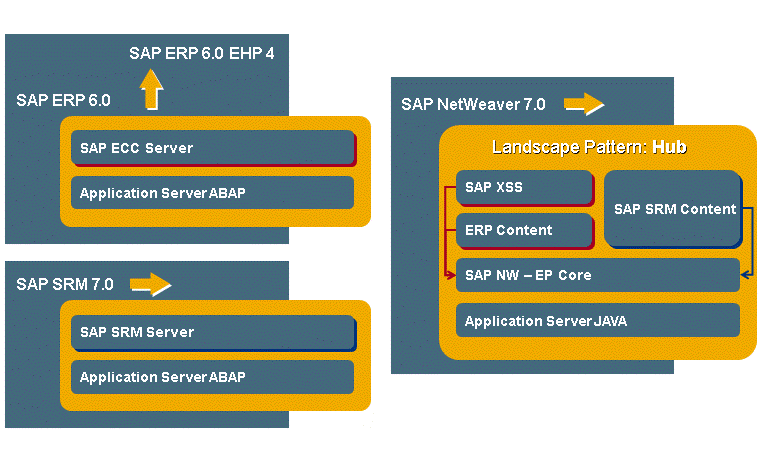
For this maintenance transaction, the Maintenance Optimizer calculates SAP NetWeaver 7.02 as the basis for the ERP product instance ECC server. As the technical system with the NetWeaver product instances is classified in the technical system as Hub, the Maintenance Optimizer checks the necessity of a maintenance transaction in the product system. According to the minimum affects principle, the product system SAP NetWeaver remains unchanged, because SAP NetWeaver 7.0 and SAP NetWeaver 7.02 are compatible for the product instances under consideration. So the installation of an enhancement package has no affect on the product system SAP SRM. No further maintenance transactions are necessary.
Example 3: Landscape Pattern: Hub
You want to update the product system SAP SRM from SAP SRM 7.0 to SAP SRM 7.0 EHP1 by installing an enhancement package.
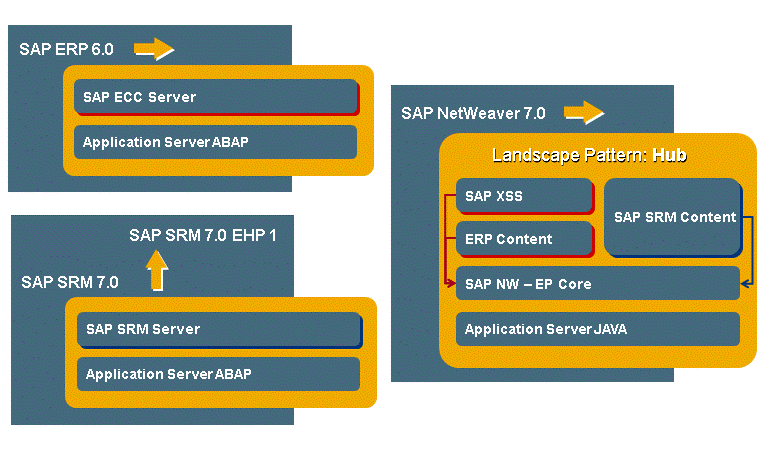
For this maintenance transaction, the Maintenance Optimizer calculates SAP NetWeaver 7.02 as the basis for AS ABAP. Analogously to example 2, the product system SAP NetWeaver remains unchanged, in accordance with the minimum affects principle, because SAP NetWeaver 7.0 and SAP NetWeaver 7.02 are compatible for the product instances under consideration. So the installation of an enhancement package has no affect on the product system SAP ERP. No further maintenance transactions are necessary.
Hub: Restricted Variability
In some system landscape constellations, it is possible that you use SAP applications in technical systems with a large delta between source and target release, in a maintenance transaction. Such exceptional cases can require a lot of maintenance activities in several maintenance transactions.
The following example illustrates this situation:
Initial constellation:
Product System |
Active product version |
Product instances installed in the technical systems |
|---|---|---|
SAP ERP |
SAP ERP 2004 |
SAP ECC Server, AS ASAP |
SAP CRM |
SAP CRM 4.0 |
SAP CRM Server, AS ASAP |
SAP NetWeaver |
SAP NetWeaver 2004 |
[SAP NetWeaver] SAP EP Core, AS Java [SAP ERP] SAP XSS [SAP CRM] SAP CRM Content |
Example 4: Landscape Pattern: Hub
You want to update the product system SAP ERP from SAP ERP 2004 to SAP ERP 6.0, including EHP 5.

For this upgrade, the Maintenance Optimizer calculates SAP NetWeaver 7.02 as the basis for SAP ERP 6.0 EHP 5. For a consistent target status, there must be an upgrade to SAP NetWeaver 7.02, according to the release of the jointly-used technical hub systems with the NetWeaver product instance AS Java.
This upgrade affects the CRM product system, because SAP CRM 4.0 and SAP NetWeaver 7.02 are not compatible for the product instances under consideration. The Maintenance Optimizer also calculates a consistent CRM target version. The result is EHP1 of SAP CRM 7.0, which is compatible with SAP NetWeaver 7.02.