 Maintenance Transaction Step Sequence
Steps Common to Different Scenarios
The Maintenance Optimizer contains several scenarios. There are some steps common to all scenarios:

Depending on the scenario selected, the Maintenance Optimizer automatically adds further steps to the standard procedure.
The system assigns a status to each step you perform. You can repeat previous steps until the transaction has the status Completed. Then you can no longer change the maintenance transaction.
Automatic Calculation of Download Files
The Maintenance Optimizer can automatically calculate the download files required, independently of the scenario which you select for the maintenance transaction.
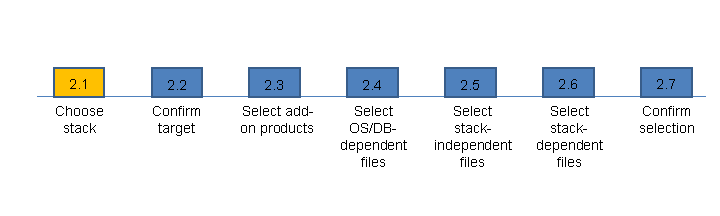
The Maintenance Optimizer automatically calculates the files required for the maintenance transaction, based on the defined system landscape, in the following additional steps:
 Recommendation
You are planning to update associated development, quality assurance and production systems, and want to ensure that you perform the same maintenance activities in all the systems, regardless of the time betwen their updates. Select all the systems in step 1 of the maintenance transaction, and perform a maintenance transaction for them. The stack files are calculated and made available for all the systems at the same time.
Recommendation
If the original system and the system in which the stack file is to be implemented have the same initial and target constellations, you can copy the stack file in a report.
For more information, see the SAP Service Marketplace, under  http://service.sap.com/mopz
  How-To's and Guides How-to guide for the stack XML copy report (SAP note 1600302)
  .
.
A detailed description of these steps is in the descriptions of the maintenance transaction scenarios. For more information, see Maintenance Transaction Scenarios.
Tabs
The following tab pages are available:
Operations
Here, you perform all steps in the maintenance transaction, during both manual selection and automatic determination of the maintenance files.
News about Maintenance Optimizer and maintenance-relevant topics are shown in step 1: Schedule Maintenance, under Maintenance Optimizer News.
The SAP security notes are also displayed on this tab page:
The number of available notes is specified in parentheses.
To update the display, choose Load Latest Security Notes.
By choosing Export, you can create an Excel list of information about the security notes.
 Note
NoteYou need to be authorized to display security notes. For further information, see the SAP Solution Manager security guide in the SAP Service Marketplace, under
http://service.sap.com/instguides SAP Components SAP Solution Manager .End of the note.For more information about SAP Notes, see System Recommendations.
Systems
Shows the current start and target constellation of your maintenance transaction in each step.
NoteThe Systems tab is only shown when you have selected a product version and product systems, in step 1. The target constellation is only shown after you have performed step 2.1.
End of the note.Log
Shows all Maintenance Optimizer system messages during your maintenance transaction.
Stack Files
Shows all XML files generated during your maintenance transaction.
NoteThe Stack Files tab is only shown after you have performed step 2.
End of the note.Documentation
Links to fürther information about the Maintenance Optimizer and enhancement packages.