 Mobile Processing
Use
The mobile processing of operational listsoffers you the following benefits:
You no longer have to print out the operational lists. This means that you no longer have to collect operational lists for processing or return them after processing. Also, you no longer need to keep printouts for several years.
You can access unprocessed operational lists from your worklist directly on site and confirm when you have processed them.
You only need to confirm once on the mobile device that the activities have been performed. This saves you time and prevents errors that could arise from transcribing operational lists.
Integration
If mobile processing is active for the Operational WCD , there are limits to how much you can reduce the operational cycle . This means that you can no longer hide the first statuses of any operational phasethat gives notice of an activity.
Prerequisites
In Customizing for
Work Clearance Management
you have defined the following:
Under
Maintain Usage for Work Clearance Documents
You have activated the mobile processing in the respective usage of the Operational WCDs.
Under
Mobile Processing
You have made both the general and the plant-specific settings for the mobile device.
You have scheduled the background job RIWC0022, which reads and archives the processed data.
Features
Instead of
printing an operational list
, you make it available to the worklist for mobile processing. The system checks for which items activities, that is, a change of operational condition/type, must and may be performed. The system sets the status
MOBI (Data on mobile device)
for these items. This locks these items so that no further changes can be made to them in the back-end system.
 Note
Note
For inspections you can also create operational lists without activities, that is, where no technical object must be switched.
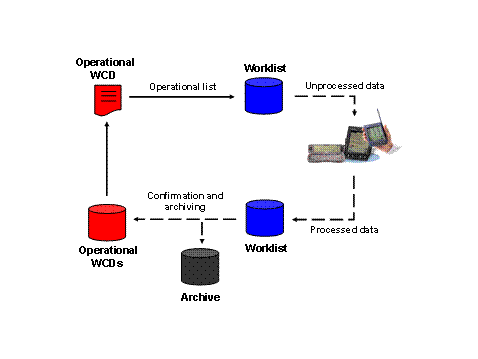
You download the data to be processed onto the mobile device. You confirm the performance of the activities on site on the mobile device. After you have completed processing of the data and no longer need the data, confirm this on the mobile device.
If you synchronize the data, the worklist for mobile processing is updated. This removes the processed data from the mobile device and, if necessary, you download new unprocessed data to the mobile device.
A background job removes the processed data from the worklist and archives it. It copies the confirmations to the Operational WCDs and revokes the status
MOBI
. This unlocks these items so that they can be processed further in the back-end system.
Status
The following statuses are possible for the whole operational list :
The operational list is released for mobile processing.
The operational list has been partially completed, all activities so far have been performed on site.
The operational list has been partially completed, at least one activity has not yet been performed.
The operational list has been completed, all activities were performed on site.
The operational list has been completed, at least one activity has not yet been performed.
The following statuses are possible for an item of an operational list:
No activity is required on site for the item.
An activity is required on site for the item.
The activity for the item has been performed on site.
The activity for the item has not been performed on site.
The following graphic illustrates mobile processing:
Activities
You call the switching screen of the Operational WCD and choose

Extras

Mobile Processing
Tagging
 or
or
Extras
MobileProcessing
Untagging.
If you choose
Extras
Mobile Processing
Overview of Operational Lists
, you see an overview of the statuses of all created operational lists. Furthermore, you can display each operational list in detail, thus displaying the statuses of individual items.