 Graphic WCM Planning
Use
You have the option of integrating any external systems you like for processing, visualizing, and maintaining work clearance documents . The most prevalent example is the integration with a graphic planning system, with which you can process items for work clearance documents.
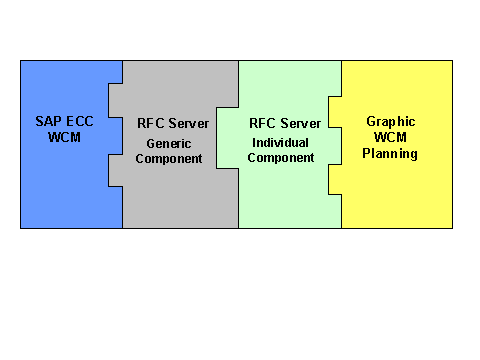
The connection between both systems is realized through an individual RFC server, which works as middleware between SAP ECC and the external system. The server is composed of two components:
Generic component
This is the statistical server library (WCMRFC.LIB), which is supplied by SAP. It makes RFC functions tailored to work clearance documents available. These functions simplify the development of a specific RFC server. This library encapsulates relevant functions of the RFC server, which are contained in the standard RFC library.
For further information, particularly on the availability of the statistical server library, see SAP note 514711.
Individual component
This is an executable program, based on the above server library. You must develop this program additionally, to implement an individual connection to a specific external system.
The following graphic clarifies the connections.
Prerequisites
In Customizing for
Work Clearance Management
under
Maintain Application Profile
you activated the graphic WCM planning and specified the name of a logical RFC destination.
Features
If you have made the necessary settings, a corresponding menu function is activated on the maintenance screen of the work clearance document. If the user performs this function, the RFC server is called up, enabling the processing of the work clearance document using the external system.
If you change item data in the external system, a consistency check is automatically performed before any further processing can take place in SAP ECC.
See also: