 Relocation Using Own Transport
Use
“Relocation using own transport” refers to a situation in which a force element relocates itself along with its materials. In such cases, the system provides functions for simplifying the subsequent logistics processes.
Prerequisites
You are familiar with the process for relocating materials .
In Customizing for
Defense Forces and Public Security
, you have created an entry for relocation step type 3 by choosing
Organizational Flexibility
→
Relocation Planning
→
Define Relocation Step Types
The value in the
F-Odoc OT
(Follow-On Document for Own Transport) field indicates the type of the logistics follow-on document.
If you enter
Purchase Order
, the system creates stock transport orders.
If you enter
Delivery
, the system creates outbound deliveries.
The
Scenario
field controls the selection of delivery items in background processing in transaction VL10B. For more information, see the Implementation Guide (IMG) for
Logistics Execution
→
Shipping
→
Worklists
→
Assignment of List Profile to Delivery Scenario
Activities
You carry out relocations using own transport in the
Relocation Using Own Transport
application
(transaction /ISDFPS/VLVET).
The following scenarios are possible:
Internal relocation using own transport with outbound delivery
The
Follow-On Document for Own Transport
field contains the value
Delivery
.
The system carries out the following actions:
The system creates outbound deliveries as logistics follow-on documents. Their delivery type corresponds to the Customizing entry in the
I.DelTy
(Internal Delivery Type) field.
Outbound deliveries that are relevant for picking are picked and the goods issue is posted.
The shipping documents are printed.

Direct creation of outbound deliveries is supported in the internal scenario only.
Internal relocation using own transport with stock transport order
The
Follow-On Document for Own Transport
field contains the value
Purchase Order
.
The system creates stock transport orders as logistics follow-on documents. Their order type corresponds to the Customizing entry in the
Int. Order Type
field.
Select the purchase orders you want to transport.
To convert the selected purchase orders to outbound deliveries, choose
Transport Start
.
The physical transport takes place.
When the goods have been delivered in the target area, select the outbound deliveries for which you want to close the transaction.
Choose
Transport End
.
The system posts goods receipts in the background for these outbound deliveries.
Cross-system relocation using own transport with stock transport order
The
Follow-On Document for Own Transport
field contains the value
Purchase Order
.
The system creates stock transport orders as logistics follow-on documents. Their order type corresponds to the Customizing entry in the
Ext. Order Type
field.
Select the purchase orders you want to transport.
To convert the selected purchase orders to outbound deliveries, choose
Transport Start
.
The system creates IDocs in the central system, which are transmitted directly to the decentralized system and posted.
The following actions are carried out:
The material document is posted.
Stock in transit is created for the receiving plant.
A shipping notification is created with the quantity posted in the goods issue.
The purchase order is created in the decentralized system.
The physical transport takes place.
When the goods have been delivered in the target area, select the outbound deliveries for which you want to close the transaction.
Choose
Transport End
.
The system posts goods receipts in the background for these outbound deliveries.
The following figure gives an overview of the complete process for the cross-system scenario:
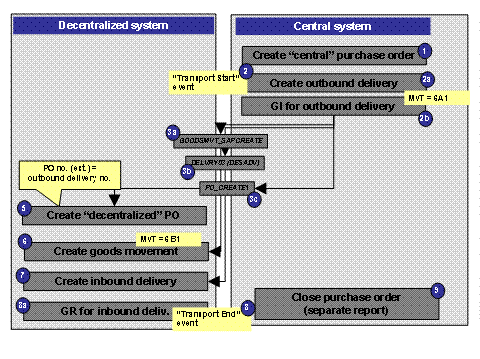
Own Transport Scenario