 Supply Network Planning Process
Purpose
You use Supply Network Planning (SNP) to model your entire supply network including all associated constraints. You can use this model to synchronize activities and plan the flow of material along the supply chain. This allows you to create feasible plans for purchasing, manufacturing, inventory, and transportation, and to closely match supply and demand.
Process
The following diagram shows the SNP cycle and the integration of SNP with the other components of SAP APO.
The sequence of the process steps described here is generally the sequence in which you should carry out the cycle. However, you may need to repeat certain steps or to proceed in a different order. Also, not all activities are mandatory.
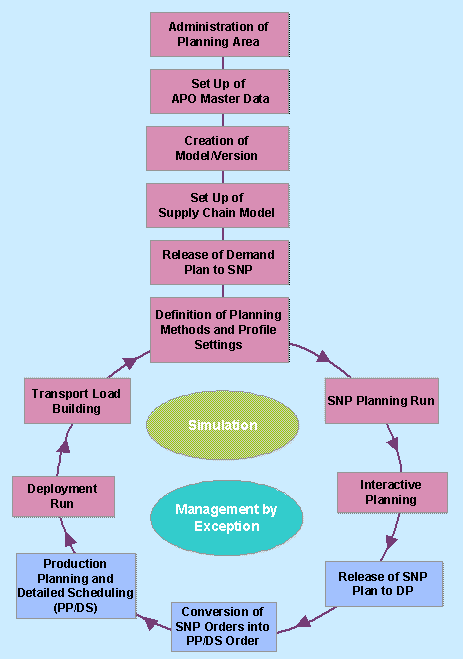
Planning Area Administration
Take all the necessary steps to set up your planning area. The planning area is the basis for all activities in SNP. It is a collection of parameters that define the scope of all planning tasks.
SAP APO Master Data Setup
Master data is a crucial aspect of the SNP component in SAP APO. You have to configure this master data very carefully to achieve satisfactory results. SNP master data includes information about locations, products, resources, production process models (PPMs) or production data structures (PDS), and transportation lanes.
Model/Version Creation
Before you set up the model in the Supply Chain Engineer (SCE), you have to create a model name and assign the model to at least one version. You can assign the model to several different versions for simulation purposes. The version is also used for releasing the demand plan (final forecast) to SNP and for releasing the supply network plan to Demand Planning.
Supply Chain Model Setup
You set up the supply chain model for SNP in SCE. There you assign the locations, products, resources, and PPMs or PDS to a model. You then add transportation lanes to link supply locations to demand locations, allocate products to the transportation lanes, and define quota arrangements.
Release Forecast Data to SNP
You release forecast data to SNP by first loading the data in a planning area in demand planning (DP) and then releasing it, or by directly releasing it from an InfoProvider. The data is often unconstrained by any production or distribution restrictions. This step can be executed by either the demand planner or the SNP planner.
Definition of Planning Method and Profile Settings
You choose whether you want to use optimization-based planning, heuristic-based planning, or supply and demand propagation as your planning method. You also decide if you want to perform safety stock planning before the Supply Network Planning run. You then make the settings in the appropriate profiles for each of the methods requiring settings. You can still change these profiles during planning for simulation purposes. You may need to define additional master data specifically for the method you are using.
Supply Network Planning Run
You perform the planning run once you have chosen the method and carried out the prerequisite steps.
The result of a Supply Network Planning run using the heuristic, the optimizer, supply and demand propagation, or Capable-to-Match is a medium-term production and distribution plan.
Interactive Planning
After the SNP run, you review the plan in the interactive planning desktop. If you run heuristic-based planning, you can also level capacities from the interactive planning table.
Release SNP Plan to DP
You release the final supply network plan back to Demand Planning (DP) to compare the demand plan (without constraints) with the constraint-based supply network plan. Major discrepancies between these two plans could trigger re-forecasting, and, ultimately, re-planning. For example, you may want to release the supply network plan back to DP if the capacity situation is not sufficient to fulfill demand created by a promotion and you need to make adjustments to the promotion planning strategy.
Converting SNP Orders into PP/DS Orders
 Note
NoteThis is not part of the SNP process since it can only be done in Production Planning and Detailed Scheduling (PP/DS). However, it is included in the cycle because this step is usually performed before running deployment and the Transport Load Builder.
End of the note.In PP/DS, you convert SNP orders into PP/DS orders to make them available for Production Planning and Detailed Scheduling.
Production Planning and Detailed Scheduling (PP/DS)
NoteThis is not part of the SNP process because it can only be run in PP/DS. However, it is included in the cycle because Production Planning and Detailed Scheduling is usually run before deployment and the Transport Load Builder, which are both part of the Supply Network Planning application component.
End of the note.In PP/DS, you create a viable production plan based on the planned orders generated in SNP.
Deployment Run
After production planning is complete and the system knows what will actually be produced (this information is saved automatically in
live
Cache), the deployment run generates deployment stock transfers.Transport Load Building
The Transport Load Building (TLB) run groups the deployment stock transfers resulting from the deployment run into TLB shipments. You can also manually create TLB shipments for stock transfers that could not be taken into account during the TLB run due to specified constraints.