Definition of Excess and Shortage
The system determines excess and shortage for all locations of a bill of distribution (BOD). An excess occurs if the projected demand is greater than the safety stock at a certain point in time. A shortage occurs if the projected demand is less than the safety stock at a certain point in time.
 Note
Note
If you perform inventory balancing for location products planned using a reorder point, the system proceeds differently than described below. For more information, see Surpluses and Shortages for Location Products Planned Using a Reorder Point.
Prerequisites
You have created inventory balancing profiles and defined parameters for the definition of excess and shortage for the individual triggers on the
SAP Easy Access
screen under
Advanced Planning and Optimization

Service Parts Planning (SPP)
Planning
Deployment and Inventory Balancing
Inventory Balancing
Define Parameter Profile for Inventory Balancing
 .
.On the
Assignment of Parameter to Area
screen you have assigned the inventory balancing profiles to the corresponding inventory balancing areas, to a version, and to an economic order quantity interval (EOQ interval).
Features
The way in which the system calculates excesses and shortages for a specific location product depends on what has triggered the inventory balancing service. The system uses the general method for the following triggers and during a normal planning run:
Unfulfilled pull deployment requisition
Increased demand within the limited freeze horizon
Destocking decision
Storage bin reduction at a location
If supersession triggers the inventory balancing service, the system uses the supersession method.
Depending on the entries you made on the SAP Easy Access
screen under Advanced Planning and Optimization
Service Parts Planning
Planning
Deployment and Inventory Balancing
Inventory Balancing
Assign Parameter Profile to Inventory Balancing Areas
, the system determines an inventory balancing profile depending on the inventory balancing area the location belongs to and the EOQ period of the location product. The parameters specified below each refer to the inventory balancing profile assigned to the location product and the trigger that caused inventory balancing.
If the location belongs to multiple inventory balancing areas, the following options are available:
The system uses one of the individually defined inventory balancing profiles for all of the areas.
The system uses the individually defined inventory balancing profiles for each inventory balancing area.
Calculation of Excess According to the General Method
If excess (n) > 0 and excess (n-1) > 0, then
excess = excess (n-1)
where excess (n) = available stock (n) - lower limit (n)
and excess (n-1) = available stock (n-1) - lower limit (n-1)
n is the excess horizon. You specify this on the SAP Easy Access
screen under Advanced Planning and Optimization
Service Parts Planning (SPP)
Planning
Deployment and Inventory Balancing
Inventory Balancing
Define Parameter Profile for Inventory Balancing
in the Excess Hor
field.
available_stock (n) is the available stock without goods receipts at the end of the shortage horizon n (= current date + n days).
lower limit (n) is the lower limit at the end of the excess horizon n. This lower limit is the same as the entry in the Planned Minimum Safety Stock Level
key figure in the distribution requirements planning (DRP) matrix.
Calculation of Shortage According to the General Method
If available stock (p) < 0
and available stock (q) < 0
and available stock parentloc <=0
then shortage = 0 - available stock (p)
p is the shortage horizon 1. You specify this in days on the Define Parameter Profile for Inventory Balancing
screen in the Short.Hor1
field.
q is the shortage horizon 2. You specify this in days on the Define Parameter Profile for Inventory Balancing
screen in the Short.Hor2
field.
available stock (q) and available stock (p) are both the available stock with goods receipts at the end of the respective horizon.
available stock parentloc is the available stock at the parent location.
Calculation of Excess According to the Supersession Method
The system calculates the excess as it does for the general method. However, the excess horizon is the time span from the current date to the shifted stock exhaustion date of the BOD of an entry location. A is the period between the stock exhaustion date of the BOD of an entry location, and the shifted stock exhaustion date of the BOD of an entry location. The product interchangeability service calculates the stock exhaustion date of the BOD of an entry location.
You specify period A in days on the Define Parameter Profile for Inventory Balancing
screen in the ExStkExDte
field.
You can see the stock exhaustion date of the BOD of an entry location in the product and location interchangeability master data for the location-specific items in the SE Date
field.
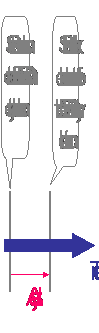
The following graphic shows the time period A on a time stream:
Calculation of Shortage According to the Supersession Method
The system calculates the shortage as it does for the general method. However, the shortage horizon is the time span from the current date to the shifted stock exhaustion date of the BOD of an entry location. B is the period between the stock exhaustion date of the BOD of an entry location, and the shifted stock exhaustion date of the BOD of an entry location.
You specify period B in days on the Define Parameter Profile for Inventory Balancing
in the ShStkExDte
field.
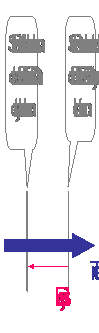
The following graphic shows the time period B on a time stream: