 Monitoring SQL Statement (Informix)


Monitoring SQL Statement (Informix)
Use
You can use the SAP/Informix database monitor to monitor Informix SQL statements. This lets you monitor the statistics for SQL statements, so enabling identification of statements which are "expensive," that is, consuming an excessive amount of resources.
Running a single SQL statement can sometimes adversely affect performance for all database users. This can happen when the amount of data being searched is very large or when a great deal of processing, such as sorting, needs to be done to the returned set of data. The result is statements which are inefficient in their use of CPU time, database buffers and disk I/Os, leading to degraded performance for all other users.
It is important to monitor SQL statistics to identify these expensive statements and to determine whether action can be taken to improve their performance.
Prerequisites
For more information about what to do before you perform this procedure, see
Checking SQL Statements (Informix).Procedure
The system prompts you for Selection Criteria (Session ID, Buffer Reads, and so on).
The system displays details of SQL statements, as shown below:
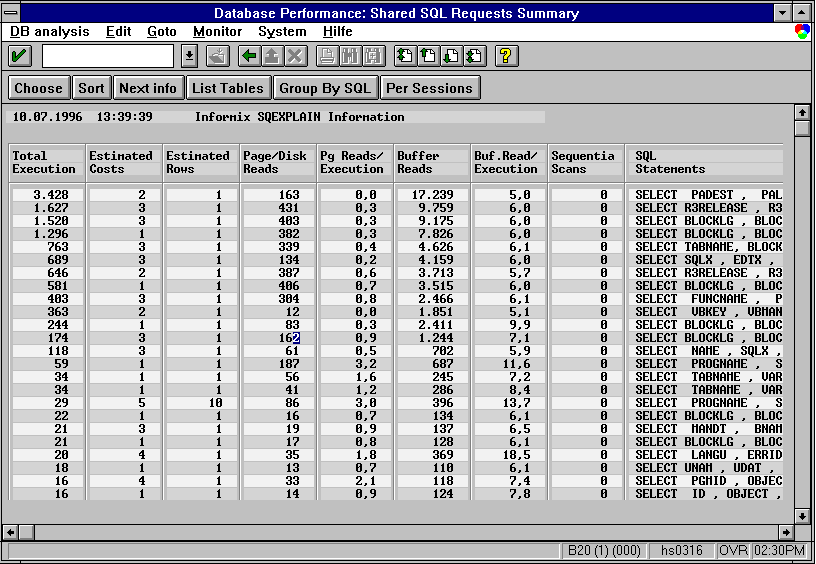
A high number of total executions is not necessarily a bad indication since some statements need to be frequently executed
Perhaps indexes exist on the table, but the SQL statement is written in such a way that it cannot make good use of them. Such expensive SQL statements often reference tables which might benefit from a new secondary index.
The information displayed cannot tell you which user or ABAP program is responsible for an expensive statement. It is sometimes difficult to find which program contains the "select" responsible for the expensive SQL statement.
Since Informix does not use a shared cursor cache, statements can be open redundantly in many sessions. The default view offered by the SQL statement monitor shows information about identical statements summarized in one line for each equivalent statement.
This tells you what access method the optimizer chooses to gather the result set for the SQL statement. In the Informix implementation, the path chosen by the optimizer depends on the values of the variables used in the "where" clause (therefore, the optimizer is the "cost-based" type). Unfortunately, the Informix system database from which the information about the SQL statements is obtained does not store these values.
To enable you to enter reasonable values in the "where" clause of the affected statement, the "Explain" function of the SQL Statement Monitor first presents you the statement in an editor, where you can change the statement as required. When you exit the editor the explain function is performed.
The explain function is only supported on "select" statements.